
The Tripwire: Why Git is the True Engine of Continuous Integration
The significance of Git in CICD pipelines.
format_list_bulleted
Table of Contents
4 sections
expand_more
If you have been following along with our posts series on CICD, you know that CI/CD is an event-driven pipeline, not a static box. We have explored how ephemeral containers keep builds clean and how CI acts as an automated mediator for distributed teams.
In this post, we are going to delve in to Git - the version control system that is a fundamental building block of CICD pipelines.
If you are transitioning from traditional IT, you might view version control simply as a backup tool or an undo button for code. In a cloud-native workflow, Git is much more than storage. It is the active dispatcher that dictates every move your CI pipeline makes.
To appreciate the significance of Git, you just need to understand that pipelines don't run on magic. They run on triggers. And in modern DevOps, the absolute center of gravity for those triggers—the brain of the entire operation—is Git.
The Source of Truth (and State)#
In traditional infrastructure management, the "truth" of what is running was often found by logging into a server and checking configuration files. If someone made a manual change directly on the server, the server became the source of truth, leaving the documentation outdated.
Git flips this model entirely. In a CI-driven world, the Git repository is the absolute, unquestionable source of truth. If a change is not documented and committed in Git, it does not exist to the CI pipeline. The pipeline trusts nothing else.
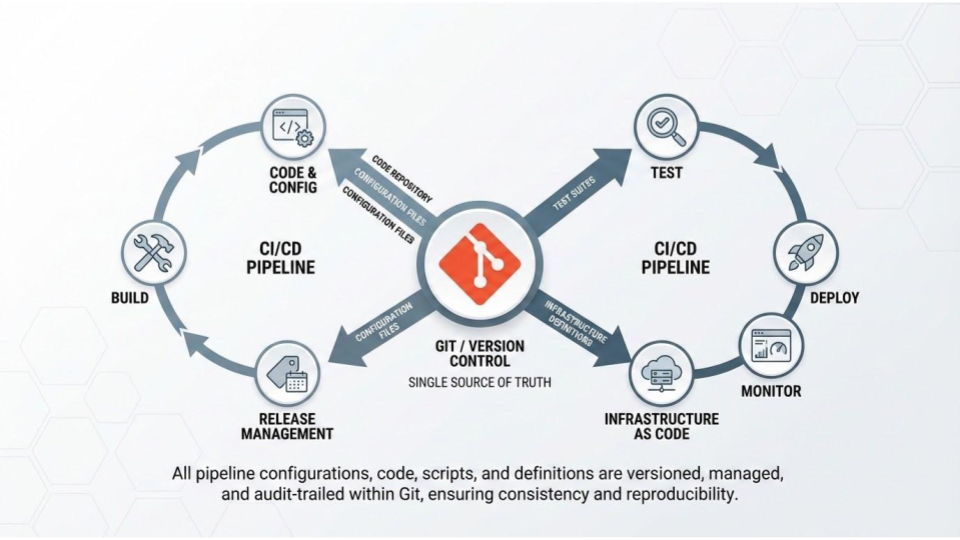
This forces a vital discipline: developers must declare exactly what they want the state of the application to be inside the repository. The CI pipeline's only job is to read that declared state and attempt to build it.
Webhooks: The Nervous System of CI#
So, how does the pipeline know when to wake up? It relies on a mechanism called webhooks.
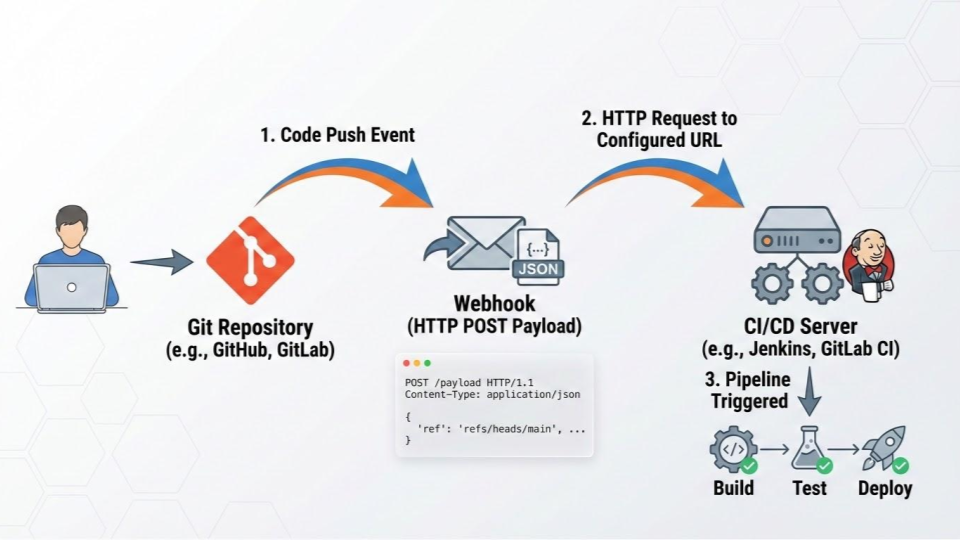
Think of a webhook as a digital tripwire. When you push code from your laptop to a remote Git repository (like GitHub or GitLab), Git recognizes that a state change has occurred.
- The Event: A developer pushes a new commit to a branch.
- The Notification: The Git server instantly fires an HTTP payload (the webhook) to your CI provider.
- The Payload: This message contains critical context: Who pushed the code, what commit hash was pushed, and which branch it landed on.
- The Action: The CI server catches this payload, reads the instructions, spins up a build runner, and begins the exact sequence of tests required for that specific code change.
Without Git acting as this highly responsive tripwire, CI would have to resort to constantly polling servers to ask, "Any changes yet?"—a massive waste of compute resources.
Context-Aware Pipelines: Branching Logic#
Because Git passes so much context through its webhooks, your CI pipeline can act intelligently based on where the code is going. It doesn't just run the same blunt sequence every time.
- Feature Branches: If Git tells the CI server that the code was pushed to an isolated
featurebranch, the CI pipeline might only run quick unit tests and a linter. It prioritizes fast feedback for the developer. - Pull Requests: If the code is involved in a Pull Request targeting the
mainbranch, the CI pipeline will run the full, exhaustive suite of integration and security tests to ensure nothing breaks before merging. - Main Branch: If Git confirms code has been successfully merged into
main, the CI pipeline switches gears. It builds the final container artifact and pushes it to the registry, preparing it for deployment.
Paving the Way for GitOps#
By establishing Git as the intelligent trigger for your CI pipeline, you are laying the groundwork for the next evolution in cloud engineering: GitOps.
Once you trust Git to trigger the building and testing of your application code, you can eventually use it to trigger the deployment of your infrastructure. But before we can deploy, we need to master the Continuous Delivery phase.
But that's a topic for a new post.

Indika Kodagoda
Indika Kodagoda is a Lead DevOps Engineer, AWS certification instructor, and the creator of CloudQubes. He specializes in cloud infrastructure, automation, and modern Ruby on Rails development. When he’s not deploying code or mentoring aspiring engineers, he’s usually enjoying nature and cycling local gravel paths.