
Containerizing the Build: The Engine Inside Your CI/CD Pipeline
Learn why containerizing your CI/CD builds provides a clean room for testing and solve the "works on my machine" problem for good.
format_list_bulleted
Table of Contents
5 sections
expand_more
This is the 3rd post on the series of posts on CICD.
In the first post, we broke the myth about CICD being interpreted as a central box.
Then, in the second post, we talked about the significant of CICD pipeline in modern DevOps.
This third post is about what actually happens inside the pipeline.
When a developer pushes code to Git, the pipeline wakes up and triggers a "CI Runner" to build and test the application. However, if that runner is just a static server configured months ago, you run into the exact same problem you face with manual deployments: dependency conflicts, leftover files from old builds, and configuration drift.
To guarantee that your build process is reliable, repeatable, and secure, you have to containerize the build process itself.
The Clean Room: Why We Build in Containers#
Imagine trying to bake a cake in a kitchen that hasn't been cleaned since the last three meals were cooked there. You might accidentally mix in leftover garlic with your vanilla frosting.
A static CI server is like that dirty kitchen. If Build #101 installs a specific system library, and Build #102 requires a conflicting version, the build fails—not because the code is bad, but because the environment is contaminated.
Containerizing the build solves this by providing a "clean room."
When the CI pipeline is triggered, it spins up a fresh, isolated container image containing only the exact operating system and dependencies needed for that specific project.
- The code is pulled into this pristine container.
- The application is built and tested.
- The final deployable image is generated.
- The build container is destroyed, wiping the slate completely clean for the next run.
Choosing the Engine: Docker vs. Podman in CI#
While Docker is the household name for containers, it relies on a background daemon running with root privileges. In a shared CI environment, giving a process root access can be a massive security risk.
This is where daemonless container engines like Podman shine. Podman allows you to build, run, and push container images entirely in user space without requiring root privileges. Integrating Podman into your CI runners drastically shrinks your attack surface while utilizing the exact same container syntax you are already used to.
Real-World Challenges: Bridging the Architecture Gap#
Containerizing the build sounds simple in theory, but the reality of modern hardware introduces some fascinating challenges that your CI pipeline must handle.
Let's look at a very common scenario: Local development versus cloud deployment.
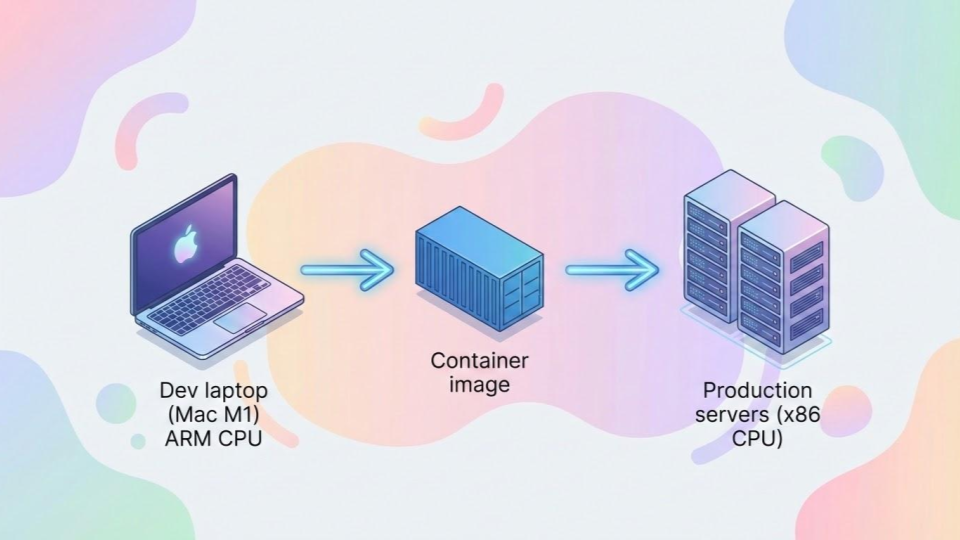
Say you are developing a Python application. You are writing code and testing it locally on a modern Mac with an M1 or M2 chip, which uses an ARM64 architecture. However, your deployment target in the cloud (like an AWS EC2 instance or an EKS cluster) is likely running on standard x86_64 (AMD64) architecture.
If your CI pipeline blindly builds a container image using the default architecture of the runner, that container will instantly crash when it reaches production with a fatal "exec format error."
A robust CI pipeline handles this translation gracefully by utilizing Multi-Architecture Builds. Tools like docker buildx or podman manifest can be configured within the CI script to cross-compile the application. The runner pulls the code, resolves platform-specific dependencies (that might have different native extensions for macOS vs. Linux), and simultaneously builds images for both ARM64 and AMD64, binding them together under a single tag in your artifact registry.
Handling Secrets in the Pipeline#
The final hurdle of the containerized build is security. During the build process, your application might need to pull private dependencies from an external repository, which requires an SSH key or an API token.
If you simply COPY an SSH key into the container or use an ENV variable during the build command, that secret gets baked into the history of the final container image. Anyone who downloads the image can extract your keys.
Modern CI build processes use Build Secrets. These allow you to mount secret files (like SSH keys) or variables temporarily during the build phase. The application can use them to download what it needs, and when the build step is finished, the secret vanishes without ever being written to the container's final layers.
The Output: An Immutable Artifact#
When the containerized build process finishes successfully, it outputs a single, immutable artifact—a finalized container image. This image is exactly what will be tested in staging, and it is exactly what will run in production. No human touches it, no dependencies are guessed at, and the pipeline is ready to hand it off to the deployment phase.

Indika Kodagoda
Indika Kodagoda is a Lead DevOps Engineer, AWS certification instructor, and the creator of CloudQubes. He specializes in cloud infrastructure, automation, and modern Ruby on Rails development. When he’s not deploying code or mentoring aspiring engineers, he’s usually enjoying nature and cycling local gravel paths.