
The Networking Black Hole: Why Your EC2 Instance Can’t Reach the Internet
Why can't your EC2 instance reach the internet? Stop making everything public to fix routing errors. Learn the exact AWS networking flow to route traffic securely.
Every cloud engineer has experienced this exact scenario:
You provision a shiny new EC2 instance. You install your application. You SSH in, type curl https://xyz.com to download a package, and... nothing. The terminal hangs. The cursor blinks mockingly. You have fallen into the AWS Networking Black Hole.
In frustration, you might attach a public IP address to the instance, open port 22 to 0.0.0.0/0, and suddenly it works.
Congratulations, you just fixed a routing problem by creating a massive security vulnerability.
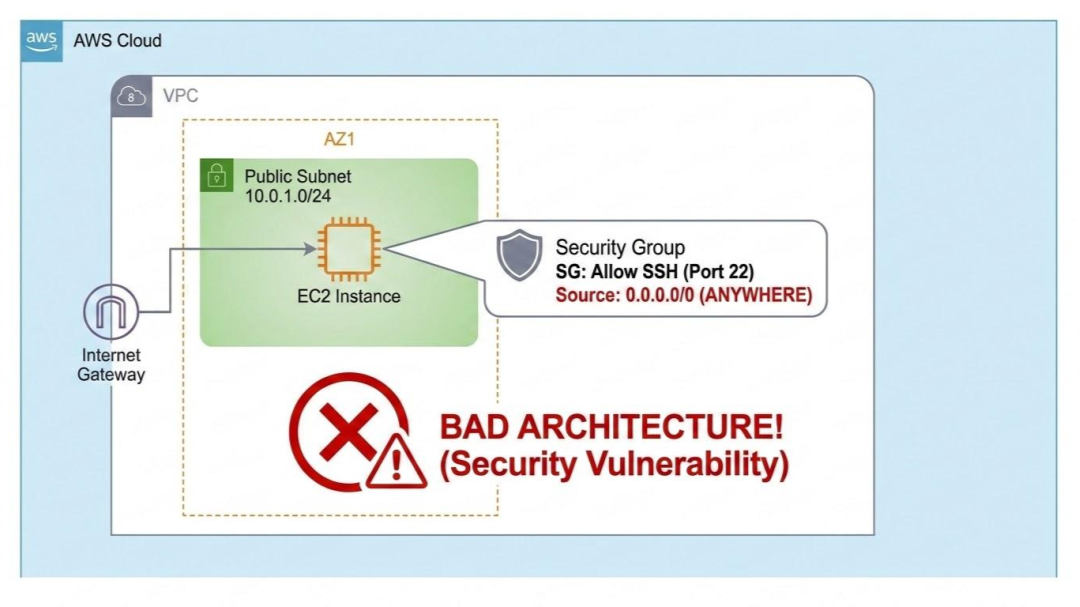
The number one reason developers fail the AWS Solutions Architect exam—and the number one reason they accidentally expose enterprise data—is a fundamental misunderstanding of software-defined networking. The cloud is not just "someone else's computer." It is someone else's data center, and you are the network architect.
If you want to stop guessing and start designing secure infrastructure, you must master the "Holy Trinity" of AWS Networking: Subnets, Route Tables, and Gateways.
The Boundary: The VPC
Think of a Virtual Private Cloud (VPC) as a walled garden. When you create a VPC, it is completely isolated from the outside world by default. Nothing goes in, and nothing comes out.
To organize this garden, you divide it into Subnets (smaller blocks of IP addresses).
Here is the most critical concept to understand: Naming a subnet "Public" or "Private" does absolutely nothing. AWS does not care what you name your subnet. A subnet's behavior is dictated entirely by its Route Table.
1. The Public Subnet (The Front Door)
A subnet is only "Public" if its Route Table has a route pointing to an Internet Gateway (IGW).
An IGW is the actual door in your walled garden. If your EC2 instance is in a subnet that routes traffic destined for the internet (0.0.0.0/0) to the IGW, and the instance has a Public IP address, it can talk to the internet, and the internet can talk back.
- What goes here? Load balancers, Bastion Hosts, and public-facing web servers.
- What DOESN'T go here? Your databases, your application backend, and your caching layers.
2. The Private Subnet (The Vault)
If your subnet's Route Table does not point to an Internet Gateway, it is a Private Subnet.
If you place a database or an application server here, it is invisible to the public internet. Hackers scanning public IP ranges will never even see it. This is exactly what you want for security.
But here is where the "Black Hole" happens. Your private application server still needs to download security patches from GitHub or hit the Stripe API. If it has no path to the internet, how does it get those updates?
3. The NAT Gateway (The Lifeline)
To allow instances in a Private Subnet to reach the internet without letting the internet initiate a connection back in, you need a NAT Gateway (Network Address Translation).
Here is the architectural flow you must memorize:
- You place the NAT Gateway inside the Public Subnet (so it has access to the IGW).
- You go to the Route Table for your Private Subnet.
- You add a route that says: "Send all internet-bound traffic (
0.0.0.0/0) to the NAT Gateway."
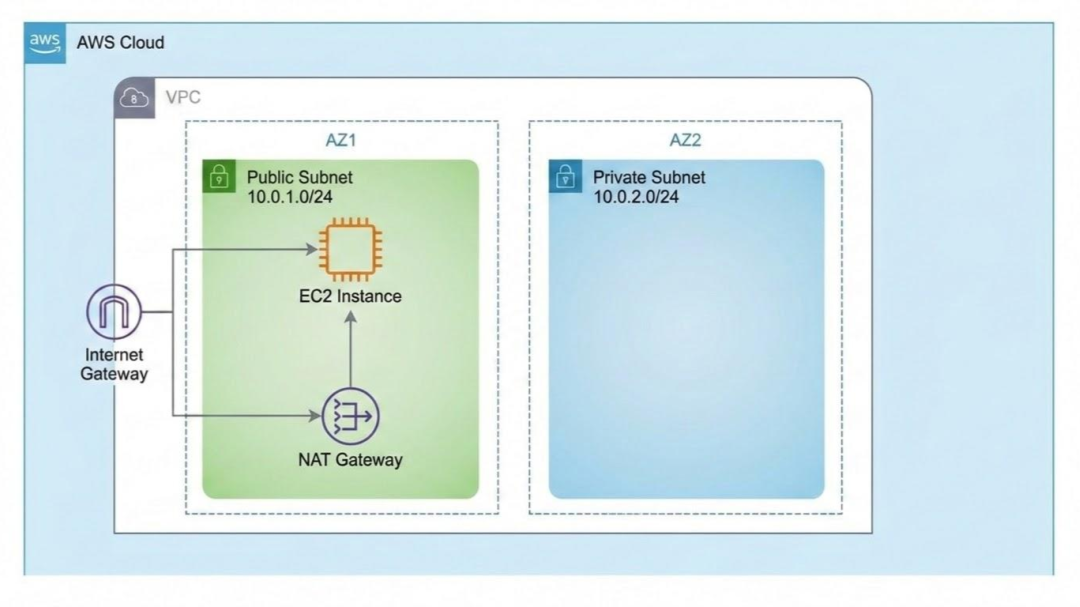
Now, when your private EC2 instance tries to curl xyz.com, the request goes to the NAT Gateway. The NAT Gateway disguises the request using its own public IP, sends it out through the IGW, gets the response, and hands it securely back to your private instance.
The "Aha!" Moment
Once you understand this flow, AWS stops feeling like a black box.
When your instance can't reach the internet, you stop blindly changing Security Groups and start tracing the route:
- Is it in a public subnet? Does the route table point to the IGW? Does it have a public IP?
- Is it in a private subnet? Does the route table point to a NAT Gateway? Is that NAT Gateway in a public subnet?
Stop Guessing, Start Architecting
"Make it public" is a junior developer's fix. "Route it securely" is a Cloud Architect's design.
In 2026, understanding how to isolate resources in private subnets while maintaining outbound connectivity isn't just exam trivia—it is a mandatory requirement for keeping your job and keeping your company out of the headlines.
Networking is heavily tested on the AWS Solutions Architect Professional exam because it is the foundation of the cloud.
Don't just try to cram everything the day before the exam.
Learn daily with Cloudqubes instead.
Sign up here and we will send you a daily question of the cloud exam your are preparing for.

Indika Kodagoda
Indika Kodagoda is a Lead DevOps Engineer, AWS certification instructor, and the creator of CloudQubes. He specializes in cloud infrastructure, automation, and modern Ruby on Rails development. When he’s not deploying code or mentoring aspiring engineers, he’s usually enjoying nature and cycling local gravel paths.