
The "Goldilocks" Era of Containers: Enter ECS Express Mode

Amazon ECS is well-known workhorse for running containers on AWS. Yet it requires some manual "plumbing"—setting up VPCs, Application Load Balancers (ALBs), Target Groups, and IAM role, etc. Nonetheless, once you get over this toil, you have a highly scalable platform for running containers.
If you don't like the toil, you have AWS App Runner. It's a black box with "push-button" simplicity. Easy to get started, but you will lose granular networking and scaling "knobs."
As of early 2026, this landscape has shifted. With App Runner moving into maintenance mode, AWS has introduced ECS Express Mode to bridge the gap.
ECS Express Mode isn't a new service; it’s like a module with high-degree of automation that plugs directly into the existing ECS ecosystem.
Under the Hood: What Actually Happens with ECS Express Mode
The common fear with "simplified" tools is that they become "black boxes". They are fine only until they keep working fine. ECS Express Mode avoids this by being an orchestration layer rather than a separate service. When you run a single deployment command, AWS doesn't hide the infrastructure; it builds it in your account, using your IAM permissions.
1. The Three-Input Engine
A standard ECS setup requires configuring over a dozen distinct resources. Express Mode collapses this by asking for only three things:
- A Container Image: (e.g., from Amazon ECR).
- Task Execution Role: The permissions your container needs to pull images and write logs.
- Infrastructure Role: This is the "secret sauce"—a role that gives ECS the permission to provision the ALB, Target Groups, and Networking on your behalf.
2. Intelligent Networking & The Shared ALB
This is where Express Mode solves the "ALB Tax."
- Automated VPC: If you don't specify one, Express Mode provisions a best-practice, multi-AZ VPC with public and private subnets.
- The 1-to-25 Ratio: Instead of one ALB per service, Express Mode's "Infrastructure Role" checks if a compatible ALB already exists in your namespace. If it does, it simply adds a new Host-Header based Listener Rule.
- DNS & SSL: It automatically generates a unique URL (e.g.,
myapp.ecs.on.aws) and handles the SSL/TLS certificate through ACM so your endpoint is HTTPS-ready by default.
3. The "Guardrail" Deployment Strategy
Express Mode doesn't just "flip a switch" when you update code; it follows a strict safety protocol:
- Default Canary (5/95): When you push a new image, Express Mode shifts exactly 5% of traffic to the new version while keeping 95% on the old one.
- The Bake Period: It monitors the health of that 5% for a pre-set "bake time."
- Automatic Rollback: If CloudWatch detects an increase in 4xx or 5xx errors from the new tasks during this window, it kills the new deployment and reverts 100% of traffic to the stable version automatically.
4. Native Observability
Every resource created by Express Mode is tagged and visible. You can see the generated Security Groups (which use least-privilege rules to only allow traffic from the ALB to the Fargate tasks) and the Auto Scaling policies (which default to Target Tracking at 70% CPU utilization).
The "Killer Feature": Shared Load Balancers
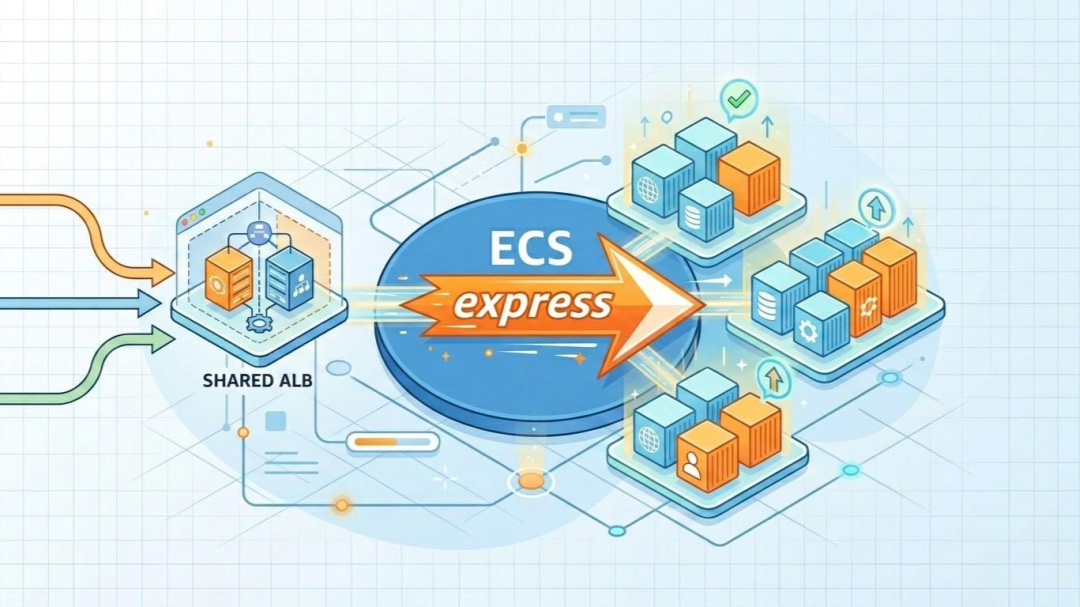
In the world of AWS architecture, the "ALB Tax" has long been a source of frustration for DevOps engineers. Traditionally, every time you launched a production-grade ECS service, you were essentially forced to provision a dedicated Application Load Balancer. At roughly $16–$22 per month (plus LCU and Public IP charges), the base cost of your networking often exceeded the cost of the compute itself for smaller microservices.
ECS Express Mode effectively kills this tax.
Breaking the 1:1 Ratio
Express Mode introduces a 1-to-25 shared architecture. Instead of creating a new ALB for every deployment, it allows up to 25 separate services to reside behind a single, high-performance load balancer.
When you deploy a new service, the Express Mode controller performs a "Namespace Check":
- It looks for an existing "Express-Managed" ALB within your designated namespace or VPC.
- If it finds one, it dynamically creates a new Listener Rule and Target Group.
- It uses Host-Header Routing to direct traffic (e.g.,
api.example.comandweb.example.comboth hit the same ALB but are routed to different Fargate tasks).
Why This Matters for Your Budget
For a startup or a developer managing a lab environment, the math is compelling.
- The Old Way: 10 microservices = 10 ALBs = ~$250/month in fixed networking costs.
- The Express Way: 10 microservices = 1 Shared ALB = ~$25/month in fixed networking costs.
This 90% reduction in baseline networking costs makes ECS a viable competitor to "Function-as-a-Service" (Lambda) for low-traffic applications that still require the persistent nature of a container.
Production-Ready "Multi-Tenancy"
While the costs are shared, the isolation remains intact. Express Mode automatically handles:
- SSL/TLS Certificates: It leverages SNI (Server Name Indication) to serve multiple SSL certificates from a single ALB, ensuring every microservice remains encrypted and secure.
- Security Groups: Express Mode generates granular security group rules that only allow the shared ALB to talk to the specific ports of your container, preventing "lateral movement" between different services on the same load balancer.
- Independent Scaling: Even though they share a load balancer, your services scale independently. High traffic to your
reporting-servicewon't force yourauth-serviceto scale up.
You no longer have to choose between "Best Practice Architecture" and "Cost Optimization." You get both by default.
The Fine Print: The "One-Service" Exception
While the shared ALB model is a game-changer for microservices, it is important to manage expectations for solo projects.
If you are deploying only one service in a namespace, you will not see immediate cost savings. Because Express Mode provisions a dedicated, production-grade Application Load Balancer to host your first service, you will still inherit the standard ALB base fee (approximately $20–$30/month depending on your region and IPv4 usage).
The real financial ROI of Express Mode triggers the moment you deploy your second service. By absorbing that second (and third, and twentieth) application into the existing infrastructure, you effectively reduce your "networking overhead per app" toward zero.
My Advice: If you are running a single, low-traffic hobby project and cost is your primary driver, AWS Lambda with Function URLs remains the most economical choice. However, if you plan to grow into a multi-service architecture, starting with Express Mode builds the scalable foundation you’ll eventually need.
Deployment Strategies for ECS Express Mode
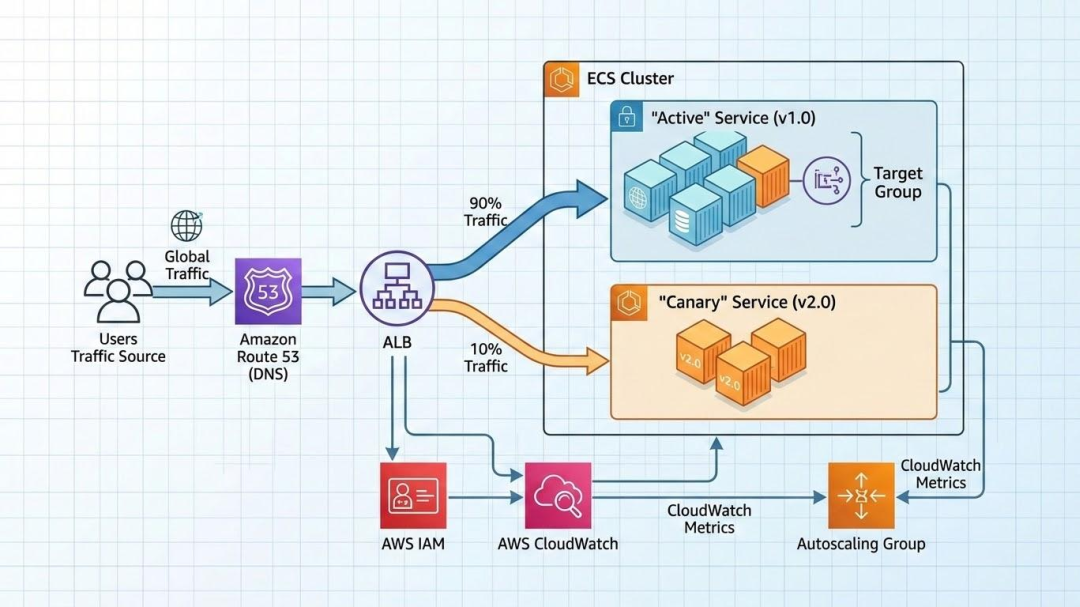
The primary goal of ECS Express Mode is to reduce the "blast radius" of human error. In a standard ECS setup, developers often default to simple rolling updates that might replace healthy tasks with broken ones before a health check even fails.
Express Mode changes the default behavior to a Managed Canary Deployment, shifting the focus from "just deploy" to "validate, then scale."
1. The Default: Managed Canary (5/95)
By default, Express Mode uses a staged traffic-shifting strategy. When you update your service with a new container image:
- The Green Environment: AWS provisions a new set of Fargate tasks (the "Green" environment) alongside your existing "Blue" tasks.
- The Initial Shift: Exactly 5% of your traffic is diverted to the new version.
- The Bake Period: The system enters a mandatory 3-minute bake period. During this time, the ALB monitors the new tasks for health and stability.
2. Built-in Circuit Breakers & Rollbacks
The real power of Express Mode lies in its automated "Self-Healing" during deployment. It configures a CloudWatch Metric Alarm by default that monitors for deployment failures.
- The Threshold: If the sum of 4xx and 5xx error percentages from the new tasks exceeds 1% for two consecutive data points within the bake period, the deployment is marked as failed.
- Zero-Toil Rollback: The moment the alarm triggers, ECS automatically redirects 100% of traffic back to the original stable tasks and terminates the faulty Green environment. No manual intervention or "emergency rollback" scripts are required.
3. Traffic Shifting Logic
Once the bake period passes without alarms, Express Mode completes the cutover:
- Final Shift: 100% of traffic is moved to the new version.
- Graceful Termination: The old tasks enter a "Draining" state, allowing existing connections to finish before the containers are stopped.
Comparison: Standard vs. Express Deployments
| Strategy Component | Standard ECS (Default) | ECS Express Mode |
|---|---|---|
| Primary Method | Rolling Update (Batch-based) | Canary (Traffic-based) |
| Initial Exposure | Depends on batch size | Strict 5% limit |
| Validation | Container Health Check only | CloudWatch Alarms + Health Checks |
| Rollback | Manual or Circuit Breaker | Fully Automated via Alarm |
| Downtime Risk | Moderate (if health checks are slow) | Near Zero |
Pro-Tip: The "Bake Time" Trade-off
While the 3-minute bake time ensures safety, it can feel slow during rapid development or testing. If you are in a non-production environment and need to move faster, you can override these settings via the CLI by adjusting the deploymentConfiguration to use a standard rolling update, though we recommend keeping the Canary defaults for anything customer-facing.
When to Use Standard ECS Over Express Mode
While Express Mode is the new "best practice" for standard web apps and APIs, it is not a one-size-fits-all solution. Because it relies on sensible defaults to achieve its speed, there are specific architectural requirements that necessitate a "Standard" ECS configuration.
Think of Express Mode as a high-speed lane: it’s the most efficient route, but your "vehicle" has to fit the requirements. If you need a custom build, you take the standard lane.
1. Specialized Hardware (GPUs & EC2)
Express Mode is strictly Fargate-only. If your application requires specialized hardware that Fargate does not support, you must use Standard ECS with the EC2 Launch Type. Common examples include:
- Machine Learning: Applications requiring NVIDIA GPUs for inference.
- High-Performance Computing (HPC): Tasks that need specific EC2 instance families (like the C7g or R7g) for extreme CPU or memory ratios.
- Windows Workloads: Legacy .NET applications that require Windows Server containers.
2. Complex Networking & Security
Express Mode automates your VPC and Security Group configuration. However, if your enterprise environment has strict "non-standard" networking needs, Standard ECS is required for:
- Multiple Target Groups: If a single container needs to listen on multiple ports (e.g., an admin dashboard on
8080and an API on443) routed through different listeners. - VPC Peering & PrivateLink: Applications that must communicate across complex, multi-account VPC structures or via private endpoints.
- Custom Service Mesh: While Express Mode supports Service Connect, advanced users requiring Istio or a fully customized AWS App Mesh will need the granular control of Standard ECS.
3. Persistent Storage (Amazon EFS)
Currently, Express Mode is optimized for "Twelve-Factor," stateless applications. If your container needs to mount an Amazon EFS (Elastic File System) volume for persistent cross-task storage—common for CMS platforms like WordPress or shared media processing—you must configure these volume mounts via a Standard ECS Task Definition.
4. Advanced Deployment Strategies
Express Mode defaults to Rolling Updates and basic Canary shifts (e.g., 5% initial traffic shift). Use Standard ECS if your operations require:
- Blue/Green with CodeDeploy: For full environment isolation and manual "all-clear" validation before shifting 100% of traffic.
- Custom Placement Strategies: Using "Binpacking" to minimize costs on EC2 instances or "Spread" to ensure high availability across specific racks or Availability Zones.
Comparison Matrix: Which should you choose?
| Feature | ECS Express Mode | Standard ECS |
|---|---|---|
| Ideal For | Web Apps, APIs, Microservices | Data Processing, ML, Legacy Apps |
| Compute Engine | Fargate (Serverless) | Fargate or EC2 |
| Storage | Ephemeral (20GB+) | Ephemeral, EFS, EBS |
| Setup Toil | Near Zero | High (Manual/IaC) |
| Cost Control | Shared ALBs (Cheaper) | Dedicated Resources |
The "Eject" Strategy
The beauty of the 2026 ECS ecosystem is that you are never locked in.
Because Express Mode creates standard AWS resources in your account, you can "eject" at any time. If you start with Express Mode and later realize you need an EFS mount or a GPU, you can simply modify the existing Task Definition and Service through the Standard ECS console or your Terraform/OpenTofu scripts.