
Saving Money on AWS: The Pragmatic Guide to Docker IPv6 Networking
How to use IPv6 networking for Docker workloads on AWS to avoid public IPv4 costs.
If you are running Docker workloads on AWS, you might be burning money on IPv4 networking without realizing it.
For years, we treated IPv4 addresses as "free" commodities. But as of 2024, AWS charges for every single public IPv4 address you use. On top of that, if you want your private containers to talk to the internet (to pull images, call external APIs, or update packages), you are likely paying a "NAT Tax" via expensive NAT Gateways.
There is a better way: IPv6.
This guide explains why you should care, why Docker’s IPv6 support is finally ready for prime time, and the exact steps to set up the most cost-effective networking model on AWS: IPv6 NAT.
The Hidden Costs of IPv4 on AWS
Before we dive into the technical details, let’s look at the bill.
If your application needs to talk to the internet, you typically have two choices in the IPv4 world. Both come with a price tag:
Public IPv4 Address: You assign a public IP to your EC2 instance.
- Cost: $0.005 per hour (~$3.60/month).
- Downside: Your instance is directly exposed to the internet.
NAT Gateway: You keep your instance private and route traffic through an AWS NAT Gateway.
- Cost: $0.045 per hour + $0.045 per GB processed.
- Real impact: Just having one NAT Gateway idle costs about $32/month. If you push 1TB of data, that’s another $45.
The IPv6 Alternative:
IPv6 addresses on AWS are free. Even better, AWS offers an "Egress-Only Internet Gateway" for IPv6 which is completely free (no hourly usage fees). It allows your instances to talk outbound to the internet without allowing inbound connections—giving you the security of a private subnet without the cost of a NAT Gateway.
When running your workloads directly on the host OS (virtual server's OS), you can start getting the benefit of IPv6 immediately after your virtual server is assigned with an IPv6 address.
But, if you are running your workload on Docker, there are few things to consider.
Docker and IPv6: A Maturity Report
For a long time, enabling IPv6 in Docker was considered "experimental" and "risky." You had to enable special flags, and it often broke standard networking features.
That has changed. With modern Docker versions (v20.10+ and especially the new v27+ releases), support for IPv6 is stable and mature. The introduction of the native ip6tables integration means Docker can now manage IPv6 firewall rules just as easily as it manages IPv4.
The Two Paths: Global Routing vs. NAT
When enabling IPv6 in Docker, you have two architectural choices.
1. Globally Routable IPv6 (The "Pure" Way)
In this model, every single container gets its own public, globally unique IPv6 address.
- How it works: When creating an IPv6 network on Docker, you assign a globally unique IPv6 address pool to the network. All Docker containers running in this network is assigned an IPv6 address from this pool. The container's IP is routable on the public internet.
- Pros: True end-to-end connectivity; no NAT traversal issues.
- Cons: Requires complex routing setups. On cloud providers like AWS, the upstream router expects to talk only to your EC2 host. If it sees traffic coming from a container's IP it doesn't recognize, it drops the packet. You have to use "NDP Proxies" to trick the router. It is fragile and hard to maintain.
2. IPv6 NAT (The "Pragmatic" Way)
In this model, containers get private "Unique Local Addresses" (ULAs) inside the host. When they talk to the internet, the host "masks" their traffic using its own public IPv6 address.
- How it works: Identical to how Docker handles IPv4 today.
- Pros: It works instantly on AWS and all other cloud providers who support IPv6. No upstream router configuration is needed. It provides a natural security firewall (outbound allowed, inbound blocked by default).
- Cons: Purists hate it because "IPv6 wasn't meant to be NATed."
Why IPv6 NAT is the Winner for AWS
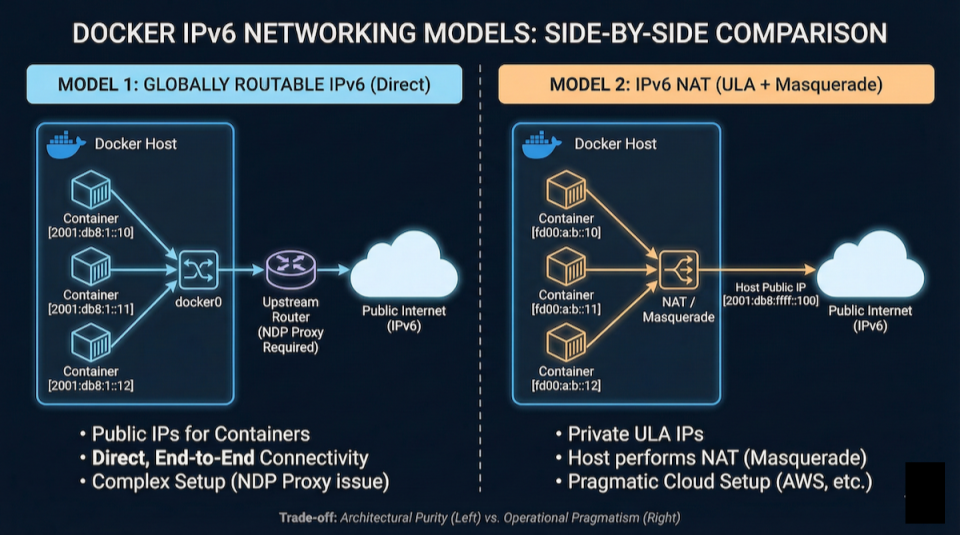
For 99% of DevOps engineers, IPv6 NAT is the correct choice on AWS.
Why? Because of the "Layer 2 Problem." AWS assigns an IPv6 subnet to your VPC, but it routes traffic specifically to the interface of your EC2 instance. It does not natively know how to route traffic to the random subnets Docker creates inside your instance.
If you try to use Globally Routable IPv6, you will spend days fighting with ndppd (Neighbor Discovery Protocol Proxy) to manually advertise every container's address to the AWS router. It is a maintenance nightmare.
IPv6 NAT bypasses this entirely. Your containers talk to the internet using the host's IP. AWS is happy, your wallet is happy, and your containers have internet access.
Hands-On Guide: Running Docker with IPv6 NAT on an EC2 instance
Here is how to set this up on an Ubuntu EC2 instance.
Prerequisites
Launch an AWS EC2 instance in an IPv6 subnet.
Here's an OpenTofu configuration, if you prefer to do it in IaC way.
Step 1: Install Docker
Install Docker following the instructions here.
Step 2: Create IPv6 network in Docker
Create Docker IPv6 network:
docker network create --ipv6 my_ipv6_network
Check the IPv6 subnet assigned to my_ipv6_network:
docker network inspect my_ipv6_network
#output truncated for clarity. Subnet values may be different.
...
        "EnableIPv4": true,
        "EnableIPv6": true,
        "IPAM": {
            "Driver": "default",
            "Options": {},
            "Config": [
                {
                    "Subnet": "172.18.0.0/16",
                    "IPRange": "",
                    "Gateway": "172.18.0.1"
                },
                {
                    "Subnet": "fd40:ee7e:1fb4::/64",
                    "IPRange": "",
                    "Gateway": "fd40:ee7e:1fb4::1"
                }
            ]
        },
...
We have created a dual-stack network in Docker.
Step 3: Verify and Test
Now, let's spin up a container and prove it can talk to the IPv6 internet.
Run a container that curls a Google IPv6 endpoint:
docker run --network my_ipv6_network --rm curlimages/curl curl -v -6 https://ipv6.google.com
What you should see:
You will see a HTTP response followed by a successful SSL handshake.
Following line (the IPv6 address and port may be different) confirms your container is using IPv6 to reach the outside world.
* Established connection to ipv6.google.com (2607:f8b0:4004:c1b::65 port 443) from fd40:ee7e:1fb4::2 port 51540
Limitations
We have successfully setup a Docker container that can talk to the Internet via IPv6. And we are not using any public IPv4 addresses.
In this setup, we cannot talk to endpoints that do not support IPv6 yet. Most do. We had no trouble in updating Ubuntu repos and downloading Docker containers from DockerHub via IPv6.
But, you will sometimes encounter IPv4 only endpoints too. If you do, you'll have to use AWS NAT Gateway.
Wrapping up
We demonstrated this Docker IPv6 networking setup on AWS. But, it's valid for any other cloud that supports IPv6.
IPv6 NAT is the way to go for IPv6 for Docker containers. Consider using globally routable IPv6 addresses for Docker containers, only if you have a very special requirement.
By enabling IPv6 NAT, you get the best of both worlds: the cost savings of IPv6 on AWS and the operational simplicity of the Docker networking model you already know.
You can finally delete that expensive NAT Gateway and stop paying the "IPv4 Tax."

Indika Kodagoda
Indika Kodagoda is a Lead DevOps Engineer, AWS certification instructor, and the creator of CloudQubes. He specializes in cloud infrastructure, automation, and modern Ruby on Rails development. When he’s not deploying code or mentoring aspiring engineers, he’s usually enjoying nature and cycling local gravel paths.