
From Localhost to Cluster: The "Hidden" Kubernetes Bridge in Podman
Bridge the gap between local development and Kubernetes. Learn how to use Podman's to move workloads seamlessly from localhost to production.
If you ask a DevOps engineer about the biggest friction point in their workflow, they will likely say "The YAML Gap."
We write code. We test it in Docker containers. Then, we have to rewrite our logic entirely into Kubernetes manifests to deploy it. We use docker-compose for local dev, but helm or plain manifests for production. The two worlds speak different languages.
This is where Podman stops being just a "Docker alternative" and starts being a Kubernetes accelerator.
Unlike Docker, which treats the Container as the atomic unit, Podman (like Kubernetes) treats the Pod as the atomic unit. This architectural alignment allows Podman to act as a two-way bridge between your laptop and your cluster.
Here is how Podman bridges the gap.
1. Thinking in "Pods" (Locally)
In the Docker world, if you want to run an application and a database together, you use docker-compose. It’s great, but it’s a dead end. Kubernetes doesn't natively understand docker-compose files.
Podman allows you to create actual Pods on your local machine.
A Pod is a group of containers that share the same network (localhost), storage, and process namespace. This is exactly how K8s works.
The Workflow:
Instead of linking containers over a bridge network, you create a "sandbox" (the Pod) and drop containers into it.
# 1. Create the "shell" (The Pod) and open port 8080
podman pod create --name my-app-pod -p 8080:80

# 2. Add your database to the Pod
podman run -dt --pod my-app-pod --name db postgres

# 3. Add your app to the Pod
podman run -dt --pod my-app-pod --name webapp my-image
The DevOps Benefit:
Your local environment now mirrors production architecture. Your web app talks to the database on localhost:5432, just like it will in the cluster. No "magic" DNS or networking hacks required.
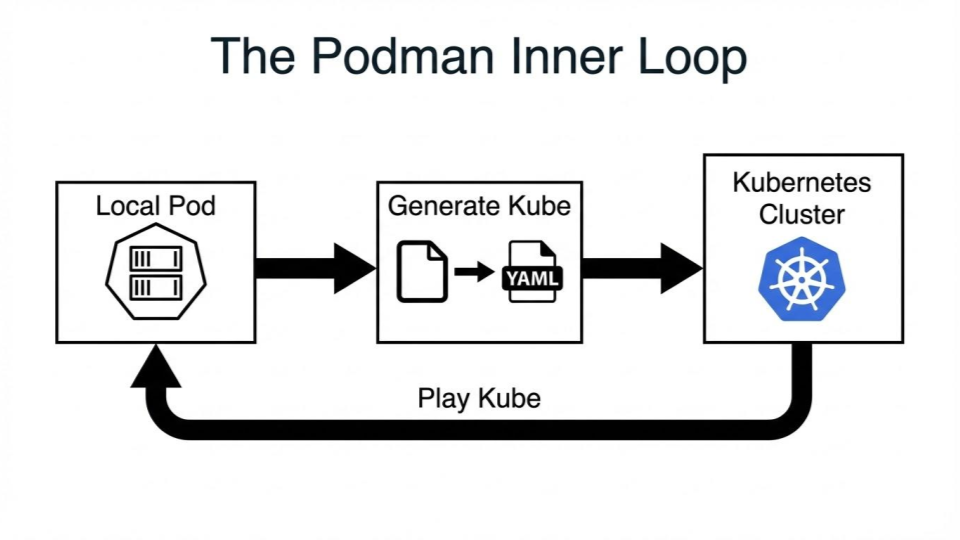
2. The "Export" Trick: generate kube
This is Podman's killer feature.
Once you have your application running perfectly in a local Podman Pod, you don't need to open a text editor and write 50 lines of YAML from scratch. Podman can inspect the running containers and write the Kubernetes manifest for you.
podman generate kube my-app-pod > deployment.yaml
What you get:
A valid, ready-to-deploy Kubernetes manifest containing:
- The Pod specifications.
- The container image definitions.
- The port mappings.
- The volume mounts.
You can take this file and immediately run kubectl apply -f deployment.yaml to your cluster. It eliminates the "translation error" between dev and ops.
3. The "Import" Trick: play kube
The bridge goes both ways.
Often, a developer needs to debug a bug that only exists in production. They have the Kubernetes YAML files, but spinning up a full cluster (even Minikube) just to run one microservice is overkill.
Podman can natively "play" Kubernetes YAML files.
# Run a K8s manifest directly on your laptop
podman play kube ./production-deployment.yaml
Podman reads the YAML, understands the Pod definition, and spins up the containers locally exactly as described in the file.
The DevOps Benefit:
- Rapid Debugging: Pull a manifest from the cluster, run it locally, fix the bug, regenerate the YAML, and push.
- Lightweight CI: Your CI pipeline doesn't need a Kind cluster to test deployment logic. It just needs Podman to "play" the YAML and verify the service starts.
Conclusion: Closing the Loop
Docker is an engine for running containers. Podman is an engine for running Pods.
For teams moving to Kubernetes, this distinction is critical. By using Podman, you aren't just swapping out a runtime; you are aligning your development workflow with your production reality.
Stop translating. Start integrating.

Indika Kodagoda
Indika Kodagoda is a Lead DevOps Engineer, AWS certification instructor, and the creator of CloudQubes. He specializes in cloud infrastructure, automation, and modern Ruby on Rails development. When he’s not deploying code or mentoring aspiring engineers, he’s usually enjoying nature and cycling local gravel paths.