
Ditch Docker Run: Deploying Production-Grade Containers with Podman Quadlets
Learn how to deploy production-grade, rootless containers on Enterprise Linux using Podman Quadlets. Ditch docker-compose and manage pods natively with systemd.
When deploying containers on Enterprise Linux (RHEL, Fedora, CentOS), the traditional docker run or docker-compose approach often fights against the host operating system. Managing container lifecycles, ensuring they start on boot, and scheduling ephemeral tasks usually requires messy shell scripts or installing cron inside your containers.
Enter Podman Quadlets.
Quadlets allow you to define containers natively as systemd unit files. Instead of writing a docker-compose.yml, you write a .container or .pod file, and systemd handles the rest—including dependency management, logging, and auto-restarts.
Here is how to deploy a robust, rootless container architecture using Quadlets.
The Architecture: Pods, Daemons, and Timers
Let's look at a real-world scenario: A ChatOps pipeline consisting of two tools that need to share a directory.
- A Listener Daemon: A long-running process that polls an API.
- A Reporter Task: A scheduled job that generates a report every morning.
Instead of stuffing both into a single container or running a heavy orchestrator like Kubernetes, we can cleanly separate them using Quadlets.
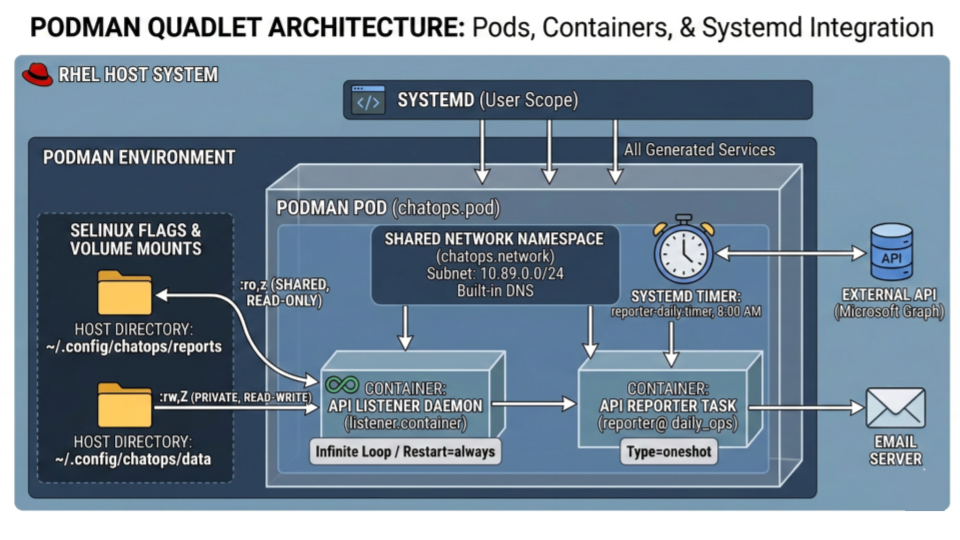
1. Defining the Network and the Pod
First, we define a dedicated custom network for security, isolating our containers from the host's interfaces.
~/.config/containers/systemd/chatops.network
[Unit]
Description=Isolated network for ChatOps

[Network]
Subnet=10.89.0.0/24
Next, we define the Pod. A Pod ensures our containers share the same network namespace.
~/.config/containers/systemd/chatops.pod
[Unit]
Description=ChatOps Application Pod

[Pod]
Network=chatops.network

[Install]
WantedBy=default.target
2. The Long-Running Daemon
For our listener, we create a .container file. Notice how we link it to the pod and handle Enterprise Linux's strict SELinux policies natively using volume flags.
~/.config/containers/systemd/listener.container
[Unit]
Description=API Listener Daemon
Requires=chatops.pod
After=chatops.pod

[Container]
Image=localhost/api-listener:latest
Pod=chatops.pod

# The :z flag tells SELinux to allow multiple containers to read this shared volume
Volume=%h/.config/chatops/reports:/app/reports:ro,z

# The :Z flag strictly isolates this directory for this specific container instance
Volume=%h/.config/chatops/data:/app/data:rw,Z

[Service]
Restart=always
TimeoutStartSec=30

[Install]
WantedBy=default.target
3. Replacing Cron with Systemd Timers
The most powerful feature of Quadlets is replacing containerized cron with native systemd timers. We can define a container that runs a specific command, exits, and is triggered by the host OS.
First, the container definition (notice Type=oneshot and no Restart=always):
~/.config/containers/systemd/reporter@.container
[Unit]
Description=Reporter Task (%i)
Requires=chatops.pod
After=chatops.pod

[Container]
Image=localhost/api-reporter:latest
Pod=chatops.pod
Volume=%h/.config/chatops/reports:/app/reports:ro,z

# %i allows us to pass variables (like 'daily_ops') into the command
Exec=bundle exec bin/reporter /app/reports/%i.rb

[Service]
Type=oneshot
Then, the timer that triggers it every morning at 8:00 AM:
~/.config/containers/systemd/reporter-daily.timer
[Unit]
Description=Run Daily Ops Report

[Timer]
OnCalendar=*-*-* 08:00:00
Persistent=true
Unit=reporter@daily_ops.service

[Install]
WantedBy=timers.target
Deploying the Stack
Because these are native systemd configurations, bringing the entire architecture online uses standard Linux administration commands:
# Compile the Quadlet files into systemd services
systemctl --user daemon-reload

# Start the Pod and Listener
systemctl --user enable --now chatops.pod
systemctl --user enable --now listener.service

# Enable the scheduled task
systemctl --user enable --now reporter-daily.timer
Troubleshooting: When Things Go Wrong
Because Quadlets integrate so tightly with systemd, debugging them requires a slightly different mindset than just looking at docker logs. If your containers aren't starting, here is the checklist to find out why.
1. The "Silent Failure" (Service Not Found)
If you run systemctl --user daemon-reload and systemd says your service doesn't exist, the Quadlet generator likely found a syntax error in your .container file and silently aborted.
To see the exact line causing the error, force the generator to run in dry-run mode:
# The path might vary slightly depending on your RHEL/Fedora version
/usr/libexec/podman/quadlet -dryrun -user
Any syntax errors (like an unsupported configuration key) will be printed directly to your terminal.
2. Where are my logs?
Since the container is managed by systemd, its standard output and errors are captured by the system journal. Do not use podman logs. Instead, use journalctl:
# Follow live logs for the listener daemon
journalctl --user -u listener.service -f

# Check why the scheduled reporter task failed on its last run
journalctl --user -u reporter@daily_ops.service -xe
3. "Permission Denied" Inside the Container
If your application crashes because it cannot read a mounted file (and you verified the Linux chmod permissions are correct), you are almost certainly fighting SELinux.
Ensure you appended the correct SELinux label flags to your volume mounts in the .container file:
- Use
:zfor shared volumes (multiple containers need access). - Use
:Zfor private volumes (only this specific container instance needs access).
4. Services Stop When You Log Out
If you are running rootless containers, systemd ties their lifecycle to your user session. If you close your SSH connection and the containers die, you need to enable lingering for your user account:
sudo loginctl enable-linger $USER
This tells the OS to start your user's systemd manager on boot and keep it running in the background.
5. Check quadlet-generator logs
If there are errors in generating quadlets from container definitions (.container files), such errors would be logged to journalctl by quadlet-generator.
You can check these logs with:
journalctl --user -b | grep -i quadlet
This is useful for identifying syntax errors in .container files.
Wrapping up
By migrating to Quadlets, you gain centralized logging (journalctl), proper SELinux context handling without hacking permissions, and the ability to schedule ephemeral container tasks without bloating your images with cron daemons. It is the definitive way to run containers on modern Enterprise Linux environments.

Indika Kodagoda
Indika Kodagoda is a Lead DevOps Engineer, AWS certification instructor, and the creator of CloudQubes. He specializes in cloud infrastructure, automation, and modern Ruby on Rails development. When he’s not deploying code or mentoring aspiring engineers, he’s usually enjoying nature and cycling local gravel paths.