Decoding the Pull Request: The Master Switchboard of Modern CI/CD
Master the Pull Request (PR). Explore our complete guide to PRs, from code reviews to GitOps and automated CI/CD merging, for DevOps beginners.
In the world of Git-based development, a Pull Request (PR)—or a "Merge Request" if you're in the GitLab ecosystem—is essentially a digital conference table. It’s the formal way a developer notifies their team that they’ve finished a feature or a fix and would like to merge their changes into the main codebase.
Think of it as a "Request for Comments" paired with a "Proposal for Change."
The Workflow: From Code to Merge
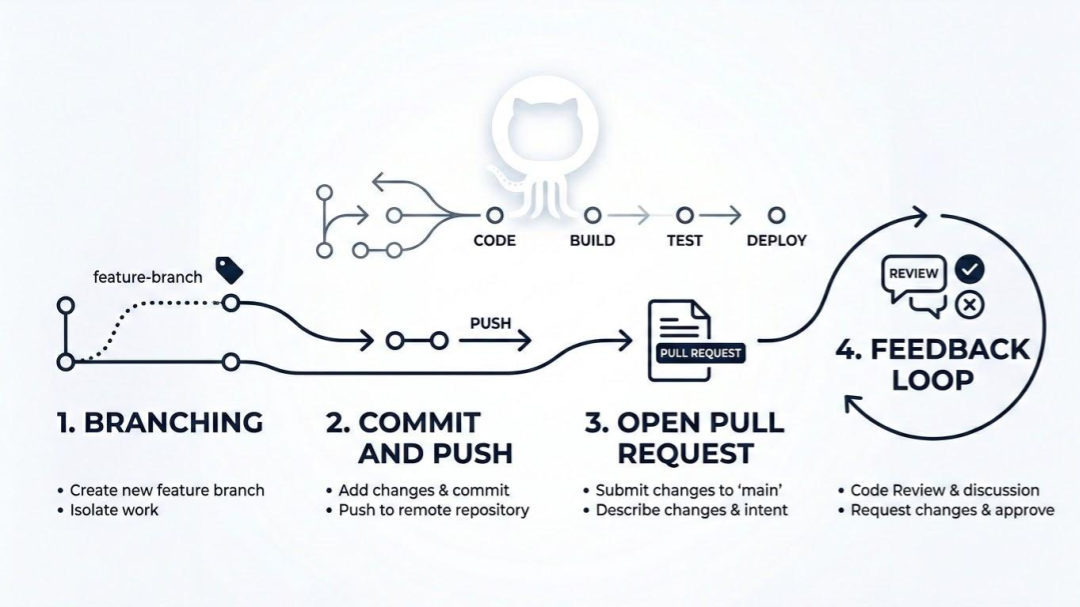
The process generally follows these steps:
- Branching: You create a separate branch (a parallel version of the code) to work on your specific task so you don't break the stable main branch.
- Committing & Pushing: You write your code and push that branch to the central server (like GitHub or GitLab).
- Opening the PR: You "open" a Pull Request. This creates a dedicated page where your team can see exactly what lines of code were added, removed, or changed.
- The Feedback Loop: This is where the magic happens. Teammates leave comments, suggest improvements, or catch bugs. As we discussed in your DevSecOps series, this is also where your CI/CD guardrails (like Bandit or Trivy) run automatically to verify the code is safe.
- Merging: Once the code is approved and the tests pass, the PR is "merged," and your changes become part of the official project.
The Significance of Pull Requests in CICD
In a traditional software environment, a Pull Request (PR) is just a way for developers to review each other's code. But in a modern CI/CD pipeline, the PR transforms into something much more powerful: it becomes the control plane for your entire infrastructure.
If the CI/CD pipeline is the factory floor, the Pull Request is the master switchboard. Here is the exact significance of the PR at every stage of the DevOps lifecycle.
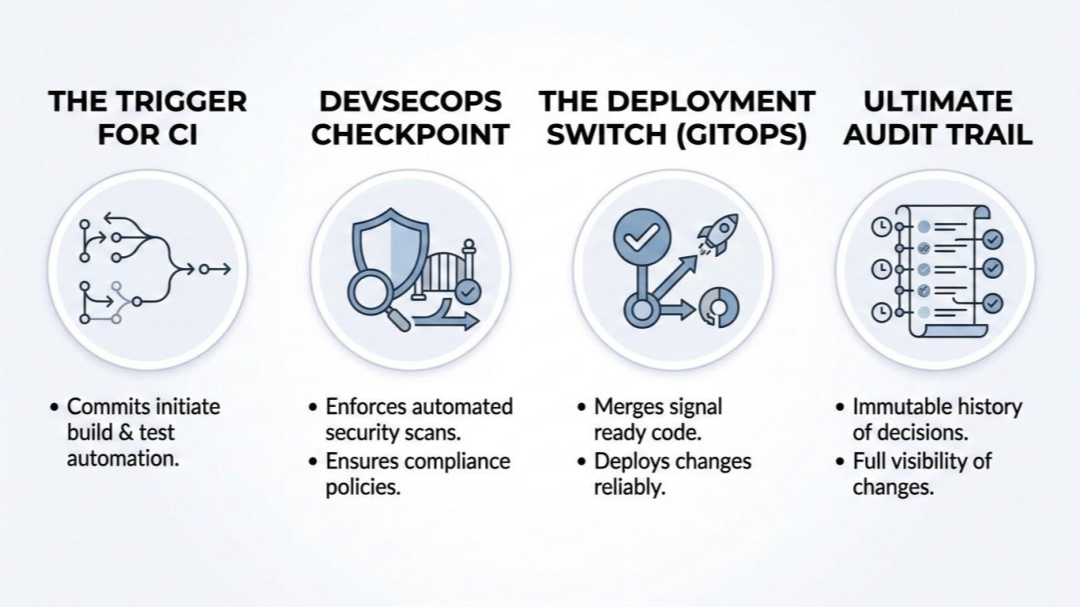
1. The Trigger for Continuous Integration (CI)
A pipeline doesn't run on magic; it runs on events. The moment a developer clicks "Open Pull Request," the CI platform (like GitHub Actions or GitLab CI) intercepts that webhook event and springs to life.
Automated Builds: The PR instructs the CI runner to pull the code, install dependencies, and build the application or container image.
Ephemeral Environments: In advanced setups, opening a PR automatically spins up a temporary, isolated version of the application just for that specific branch. Reviewers can interact with a live URL before the code is ever merged.
2. The DevSecOps Checkpoint
As we discussed with "Shifting Left," the PR is the physical location where security and quality gates live.
Instead of a human manually looking for flaws, the PR triggers your automated tools (Bandit, Trivy, Checkov).
If Trivy finds a critical CVE in the container, it sends a failing exit code back to the PR. The PR interface physically blocks the "Merge" button, ensuring that broken or insecure code mathematically cannot enter the main branch.
3. The Deployment Switch (GitOps)
This is where the PR becomes crucial for Continuous Deployment, especially in the pull-based GitOps models we explored.
The "Approval" is the Deployment: In GitOps, your Git repository represents the "desired state" of your production environment. When a senior engineer approves and merges a PR into the main branch, they aren't just updating a file.
Pulling the Trigger: Merging the PR updates the desired state. Tools like Argo CD or Flux sitting inside your Kubernetes cluster immediately detect that the main branch has changed. They automatically pull the new configuration down and update the live servers to match it.
4. The Ultimate Audit Trail
For compliance and reliability, knowing who changed what and when is critical.
Compliance: The PR creates a permanent, searchable record. It proves to auditors that every change to production was reviewed by a second human and passed all security checks.
Instant Rollbacks: If a deployment takes down production at 2:00 AM, you don't have to scramble to rewrite code. You simply click "Revert" on the PR. The pipeline runs in reverse, and Argo CD restores the cluster to the previous known-good state in seconds.
Why Is It Called PR Anyway
If you are coming from a traditional networking or sysadmin background, the term "Pull" might seem backward. Why am I requesting to pull if I am the one pushing the code?
It stems from the original open-source workflow:
- You fork a project (make your own copy).
- You make changes in your copy.
- You send a message to the original owner saying: "I have finished these changes. Please pull them from my repository into yours."
PR is arguably the most common acronym you’ll hear in the DevOps world, but it actually has two main "dialects" (Pull Request and Merge Request) depending on which platform you are standing on.
Knowing both is worth it so that you can sound like a native regardless of the toolchain your team uses.
PR (Pull Request)
Used by GitHub, Bitbucket, and Azure DevOps. This is the term that took over the world because GitHub was the first to make the "social coding" workflow mainstream.
MR (Merge Request)
Used by GitLab. GitLab argues that "Merge Request" is more accurate because the ultimate goal is to merge code into the target branch, whereas "Pull" is just the technical mechanism.
It's also worth noting that while the name changes depending on the Git provider, the action is identical.
Pull Requests Are More Than Just "Code Uploads"
PRs are not only about uploading code from developers' laptops. In the software lifecycle, a Pull Request is one point where many important things happen:
- Knowledge Sharing: Senior engineers mentor juniors by reviewing their pull requests and giving feedback for improvements.
- Safety Gate: It’s the last line of defense before code hits production. If the PR is a mess, the production environment stays safe because the code hasn't been merged yet.
- Documentation: A well-written PR description serves as a historical record of why a change was made, which is a lifesaver for future "you" or your teammates.

Indika Kodagoda
Indika Kodagoda is a Lead DevOps Engineer, AWS certification instructor, and the creator of CloudQubes. He specializes in cloud infrastructure, automation, and modern Ruby on Rails development. When he’s not deploying code or mentoring aspiring engineers, he’s usually enjoying nature and cycling local gravel paths.