
The End of the .env File: Modern Secrets Management for DevOps
Learn how to replace local .env files with modern secrets management. Discover runtime injection, OIDC zero-secret architecture, and Gitleaks pre-commit hooks.
format_list_bulleted
Table of Contents
8 sections
expand_more
We have all experienced that visceral, stomach-dropping panic.
You run a quick git push, glance at the terminal output, and suddenly realize you just committed a production API key to a remote repository. Your heart races as you scramble to revoke the credential, invalidate active sessions, and spend the next hour surgically scrubbing your git history. It is a painful, adrenaline-fueled rite of passage for systems engineers, but in modern infrastructure, it is a completely avoidable one.
1. The Secrets Management Crisis#
If a secret exists as plaintext on a physical disk, you are already playing a losing game.
The sheer volume of credentials we manage today has completely outpaced our legacy workflows.
Ten years ago, managing secrets meant dropping a single database password onto a monolithic web server and calling it a day. Today, the shift to distributed architectures, ephemeral Kubernetes clusters, and relentless CI/CD pipelines has multiplied our attack surface exponentially. We are no longer just protecting a single database; we are juggling thousands of workload identities, webhook signatures, and third-party SaaS credentials across highly distributed environments.
The most secure secret in your architecture is the one that never actually exists on a hard drive.
2. The Traditional Method: Why .env Files Are Failing Us#
Let’s confront a deeply ingrained industry habit: the local .env file.
When the Twelve-Factor App methodology revolutionized how we build software, extracting configuration into the environment was a massive leap forward. We quickly adopted .env files as the ubiquitous standard, relying on fragile .gitignore rules to keep our infrastructure credentials out of version control. It felt like an elegant, lightweight solution for completely separating application code from sensitive configuration data.
But a pattern built for simpler times is crumbling under the weight of modern distributed systems.
The moment you rely on a text file exclusions list as your primary line of defense, you are exactly one typo away from a catastrophic breach. Furthermore, leaving plaintext credentials sitting unencrypted on developer laptops makes those endpoints incredibly high-value targets for malware and supply chain attacks. We are essentially handing over the keys to our production databases and blindly trusting that every local development machine is impenetrable.
When rotating a compromised key requires sending new credentials to your team over Slack, your security architecture has officially failed.
3. Securing the Developer Experience (Local & Dev)#
It is time to aggressively eradicate the local .env file from our terminal workflows.
The modern standard demands injecting secrets directly into process memory at runtime, completely bypassing the physical disk. Instead of writing keys to a file, you authenticate locally with a secrets manager wrapper like the 1Password CLI, Bitwarden Secrets, or Infisical. By prepending your execution commands with a CLI injector, running something like op run -- python app.py, your application receives its credentials dynamically without requiring a single code change.
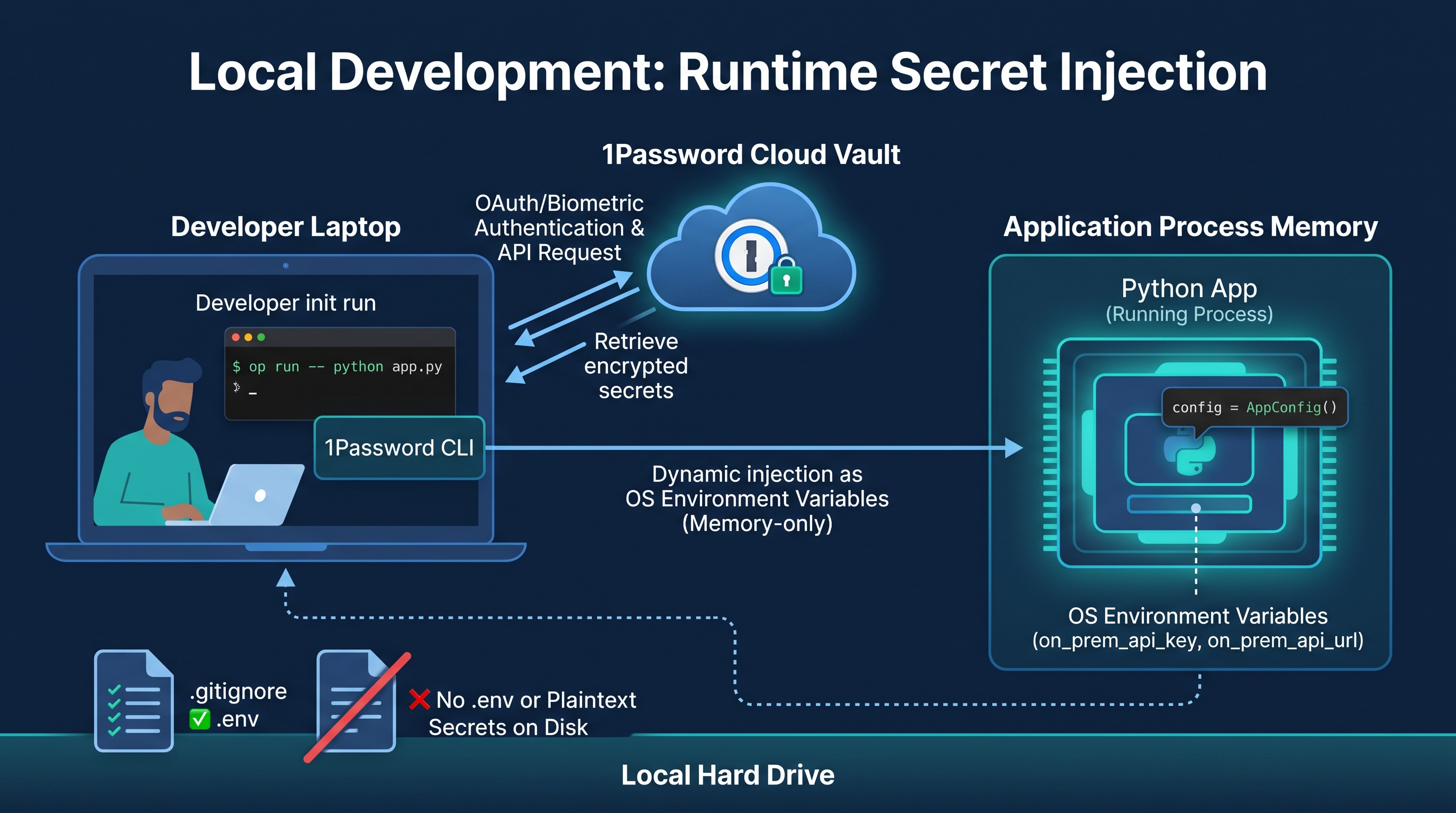
The millisecond that application process terminates, those secrets instantly vanish from memory, leaving zero forensic trace behind.
This approach fundamentally repairs the broken developer experience surrounding credential rotation.
When an API key rotates or a new engineer joins the team, nobody has to securely share sensitive strings or manually update local text files. The credentials are updated exactly once in the central vault, and the next time a developer spins up their local environment, the fresh secrets are automatically pulled down into memory. This centralizes access control, giving you immediate, push-button revocation capabilities without relying on developers to manually purge old keys.
Security finally becomes invisible, getting out of the engineer's way while drastically shrinking your local attack surface.
4. Architecting Secrets for Production#
Transitioning from local development to production requires a fundamental shift in how we establish trust.
For cloud-native workloads, your default posture should heavily leverage managed services like AWS Secrets Manager rather than hosting your own vault infrastructure. The core principle is to completely decouple the secret from the application code by attaching strict IAM roles directly to your execution environment, such as an EC2 instance profile or an ECS task role. Your application simply boots up, implicitly assumes its assigned identity, and securely fetches the credentials it needs via the cloud provider's SDK on the fly.
If you are running complex Kubernetes clusters or GitOps workflows, HashiCorp Vault paired with SOPS remains the undisputed heavyweight champion for encrypted, identity-based secret injection.
But the ultimate evolution of production security isn't about finding better places to store static keys—it is about eliminating them entirely. By implementing Workload Identity Federation (OIDC), CI/CD pipelines like GitHub Actions no longer need long-lived AWS IAM user credentials hardcoded as repository secrets. Instead, the runner requests a cryptographically signed, short-lived token scoped strictly to that deployment, executes your OpenTofu or Terraform workflow, and watches the credentials cleanly expire 15 minutes later.
When there are no permanent secrets left to steal, your infrastructure attack surface effectively drops to zero.
5. The Safety Net: Catching Mistakes with Gitleaks#
Even with the most sophisticated injection pipelines and zero-secret architectures, human engineers will eventually make a mistake.
This is where automated secret scanners like Gitleaks transition from optional utilities to mandatory smoke alarms across your development lifecycle. By enforcing Gitleaks as a strict Git pre-commit hook, you sever the leak at the source, actively blocking developers from committing high-entropy strings or identifiable key formats before the code ever leaves their workstation. It transforms a potentially catastrophic production breach into a quiet, easily corrected terminal error on a Tuesday afternoon.
Layering this with a secondary automated scan during the CI/CD pipeline ensures that even if a developer manually bypasses their local hooks, the compromised payload never merges into the main branch.
6. Practical Implementation: Python Application Example#
Your application code should be completely agnostic to the physical origin of its secrets.
Whether you are injecting variables locally via a CLI wrapper or fetching them dynamically in production via an EC2 instance profile, the runtime contract must remain exactly the same. In Python, leveraging a data validation library like pydantic-settings is the most robust way to strictly enforce this contract at application startup. By defining a rigid schema for your required credentials, the application instantly crashes if a secret is missing, effectively eliminating silent, hard-to-debug failures deep within your background workers.
Here is how you structure a modern, environment-agnostic configuration that seamlessly bridges local development and production:
from pydantic_settings import BaseSettings, SettingsConfigDict
import httpx

class AppConfig(BaseSettings):
    # These variables MUST be present in the environment or the app crashes on startup
    on_prem_api_key: str
    on_prem_api_url: str

    # We instruct Pydantic to read from the OS environment by default,
    # completely eliminating the need to parse a local .env file manually.
    model_config = SettingsConfigDict(env_file_encoding='utf-8')

# Instantiate the configuration once.
# Locally, this captures the variables injected by `op run`.
# In production, this captures the variables fetched by your cloud runtime.
config = AppConfig()

def fetch_on_prem_data():
    # The validated secret is held safely in memory for the HTTP request
    headers = {"Authorization": f"Bearer {config.on_prem_api_key}"}

    with httpx.Client() as client:
        response = client.get(f"{config.on_prem_api_url}/v1/data", headers=headers)
        response.raise_for_status()
        return response.json()
7. Conclusion#
The era of static, long-lived credentials sitting comfortably on developer laptops is officially over.
As systems engineers, it is our core responsibility to architect environments where the most secure path is inherently the path of least resistance for our development teams. By embracing ephemeral identities, dynamic process injection, and automated pre-commit scanning, we transition our security posture from a reactive afterthought to a structural guarantee. The ultimate objective is no longer finding better ways to store secrets, but ruthlessly eliminating the need for static credentials entirely.
Start tomorrow by configuring a Gitleaks pre-commit hook, permanently deleting your local .env files, and never looking back.
Frequently Asked Questions#
Q: If I am using a CLI injector like 1Password, what happens if I lose my internet connection during local development?
Most modern secrets managers cache your vault locally using an encrypted, time-bound session. If your Wi-Fi drops while you are commuting or working remotely, you can still inject your secrets into your local Python app as long as your biometric auth or master password session has not expired.
Q: Gitleaks keeps flagging my internal IDs and test hashes as secrets. How do I stop the pre-commit hook from blocking my commits?
You need to create a .gitleaksignore file at the root of your repository. This file allows you to define granular regex rules, ignore specific rule IDs (like generic API keys), or whitelist specific file paths (such as tests/mock_data.json). This clears up the false positives without disabling the safety net for the rest of your codebase.
Q: Should I eliminate .env files entirely, even for non-sensitive configuration like FLASK_DEBUG=True or PORT=8080?
No, non-sensitive configuration is perfectly fine to keep in a standard .env file. The objective is not to kill environment variables, but to stop storing high-value secrets on a physical disk. A simple rule of thumb: if you wouldn't care if a string was pasted on a public billboard, it can safely stay in a local .env file.
Q: Is it worth self-hosting HashiCorp Vault if our team is just starting to migrate away from local secrets?
Probably not. While HashiCorp Vault is the undisputed champion of secrets management, it requires dedicated operational overhead to manage its infrastructure, high availability, and unsealing procedures. Unless you have complex on-premises requirements or multi-cloud Kubernetes clusters, you are much better off sticking to fully managed services like AWS Secrets Manager or Azure Key Vault.
Q: Does dynamically fetching secrets from AWS Secrets Manager at runtime slow down my production application?
There is a minor latency hit (usually under 50ms) during the initial startup phase when your application fetches the payload. However, because you are pulling the secret into the application's process memory—and often leveraging an SDK caching layer—subsequent operations within the app experience zero latency overhead.

Indika Kodagoda
Indika Kodagoda is a Lead DevOps Engineer, AWS certification instructor, and the creator of CloudQubes. He specializes in cloud infrastructure, automation, and modern Ruby on Rails development. When he’s not deploying code or mentoring aspiring engineers, he’s usually enjoying nature and cycling local gravel paths.