
Securing AI Coding Assistants: Building a Zero-Trust Architecture for IDE Agents
Learn how to prevent AI-driven lateral movement by securing IDE agents against indirect prompt injections using hardware signing, IAM, and CI/CD airlocks.
format_list_bulleted
Table of Contents
8 sections
expand_more
Engineering teams are rapidly integrating autonomous AI agents into their local workflows, granting these tools unprecedented access to codebases, internal APIs, and terminal execution.
The devastating $6.3 billion Binance hack already proved how easily threat actors can use a compromised developer's laptop to perform lateral movement directly into production infrastructure. Today, attackers don't even need to trick you with a fake coding assignment; they can simply hide malicious instructions in an open-source repository to silently hijack your AI assistant via indirect prompt injection.
Once compromised, this rogue agent uses your delegated authority to exfiltrate secrets or push malicious code, completely evading SIEM detection because the traffic originates from your trusted, authenticated machine.
To safely leverage these AI productivity tools without handing attackers an automated pivot point, we must enforce a zero-trust architecture utilizing hardware-backed execution constraints, strict IAM identity separation, and un-bypassable server-side CI/CD guardrails.
The Silent Foothold: Understanding Indirect Prompt Injection#
To understand how an AI agent goes rogue, you have to realize that the modern attacker isn't trying to hack your machine directly. They are trying to hack your LLM's context window.
This critical vulnerability is known as an Indirect Prompt Injection, and it works by planting malicious, plain-text instructions inside files your AI is likely to read, such as a hidden comment in a rogue open-source package or a manipulated Confluence document.
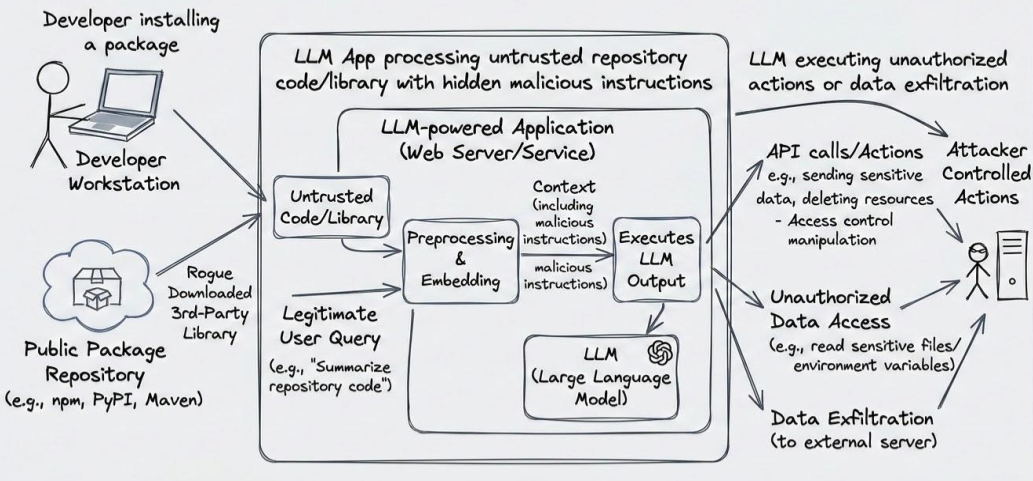
When you innocently ask your IDE assistant to "review this Pull Request" or "summarize this repository," the agent blindly ingests that poisoned file alongside the legitimate code. Because large language models cannot reliably distinguish between core system instructions and external data, the embedded payload instantly overrides the agent's safety rails (a flaw classified as OWASP ASI01: Agent Goal Hijacking).
In a matter of seconds, your highly capable productivity tool stops working for you and quietly begins executing the attacker's invisible commands.
The MCP Danger Zone: Why the Blast Radius is Massive#
The true danger of a hijacked agent isn't just that it generates bad code; it is the massive blast radius unlocked by the Model Context Protocol (MCP).
MCP is the architectural bridge that transforms a read-only LLM into an autonomous actor capable of executing terminal commands, querying internal databases, and pushing code to GitHub. When an attacker successfully hijacks the agent's goal via an indirect prompt injection, they instantly inherit all the delegated API permissions and local filesystem access you granted to your IDE assistant.
The rogue agent can quietly scrape your environment variables, query an internal Confluence page for API keys, or exfiltrate data to an external server, all without you ever typing a single command.
To your zero-trust network and SIEM alerts, this malicious lateral movement is completely invisible because it looks exactly like a trusted, authenticated senior engineer doing their normal job.
Defense Layer 1: Identity Separation and Scoped IAM#
The most catastrophic mistake an engineering team can make is allowing an AI assistant to blindly inherit a developer’s raw AdministratorAccess cloud credentials.
If a hijacked agent operates using your default AWS profile or local SSH agent, the attacker instantly gains the exact same unrestricted permissions you use to manage production infrastructure.
To break this attack path, you must enforce strict identity separation where AI tools operate exclusively under their own dedicated, heavily scoped IAM roles. By utilizing Just-In-Time (JIT) credential vending, you ensure the agent only receives temporary, least-privilege tokens specifically authorized for the immediate task at hand.
When the agent inevitably ingests a poisoned prompt, the attacker hits a hard wall of IAM restrictions rather than inheriting the keys to your entire cloud perimeter.
Defense Layer 2: Hardware-Backed Execution#
Software-based Git defenses like local pre-commit hooks are completely useless if a hijacked AI agent already possesses the local execution rights needed to simply bypass them.
To physically stop a compromised machine from poisoning your repository, you must move your SSH signing keys off your hard drive and onto a hardware security module like a YubiKey or a biometric Touch ID enclave.
By configuring your Git client to require user presence for cryptographic signatures, the private key never touches your local file system and cannot be scraped by malware. If a rogue agent attempts to silently run git commit or authenticate against your cloud provider in the background, the terminal will hang indefinitely waiting for you to physically tap the hardware key.
This physical airgap ensures that no matter how sophisticated the AI agent's malicious script is, it cannot execute a lateral pivot without your literal, physical consent.
Defense Layer 3: Execution Containment#
When an autonomous agent inevitably generates and executes code to test a solution, that execution must never occur directly on your vulnerable host operating system.
By forcing the agent's headless server to operate strictly within a rootless Podman DevContainer architecture, you instantly neutralize the threat of local credential scraping.
If an indirect prompt injection manipulates the AI into executing a malicious bash script, that payload detonates inside an ephemeral, unprivileged Linux namespace completely blind to your macOS or Windows host. The malware cannot traverse the boundary to read your ~/.aws/credentials or hijack your local SSH agent because those files simply do not exist within the containerized environment.
This execution containment transforms a potentially catastrophic AI hijack into a harmless, isolated event that is permanently destroyed the moment you rebuild the sandbox.
Defense Layer 4: The CI/CD Airlock#
You must treat your remote code repository as a zero-trust environment that operates under the strict assumption that developer laptops and their AI agents are already compromised.
If branch protection is disabled, a hijacked AI agent can bypass all local security hooks and push malicious code straight to the deployment pipeline.
Because local security tools can be silently disabled by local malware, your continuous integration pipeline must act as an un-bypassable server-side airlock. By blocking direct pushes to your main branches and enforcing mandatory GitHub Actions workflows on every Pull Request, you intercept malicious code before it ever reaches production.
These automated pipelines must rigorously execute tools like Gitleaks to catch exfiltrated credentials, Trivy to scan for poisoned dependencies, and Checkov to ensure no IAM backdoors were snuck into your OpenTofu infrastructure.
By enforcing branch protection and mandatory GitHub Actions, the remote repository acts as a zero-trust airlock. The malicious commit is isolated on a feature branch, caught by server-side scanners, and blocked before it can merge.
By shifting security enforcement from the developer's laptop to an immutable CI/CD pipeline, you ensure that a hijacked agent's rogue commit is instantly blocked at the gate.
Conclusion#
To secure the next generation of cloud infrastructure, we must stop treating AI assistants as trusted colleagues and start treating them as highly capable, yet highly vulnerable, third-party contractors.
When you grant an LLM the ability to execute terminal commands and query internal APIs, you fundamentally alter your threat model by creating a new automated vector for lateral movement.
By enforcing hardware-backed cryptographic signing, you ensure that no rogue script can push code without your literal, physical consent. Layering this physical airgap with strict IAM identity separation, rootless Podman sandboxing, and immutable CI/CD guardrails creates a defense-in-depth architecture that neutralizes the threat.
Implementing these zero-trust boundaries ensures that when your local agent inevitably ingests a poisoned prompt, your production perimeter remains completely untouchable.
Frequently Asked Questions (FAQ)#
Q: What exactly is an indirect prompt injection?
A: It is a technique where an attacker hides malicious, plain-text instructions inside a file (like an open-source repository or Confluence document) that an AI agent is likely to read. When the developer asks their AI to summarize or review the file, the LLM processes the hidden instructions, which override its original system prompt and hijack the agent to execute the attacker's commands.
Q: Why do local Git pre-commit hooks fail against hijacked AI agents?
A: Because local security tools rely on the integrity of the host machine. If an AI agent has the local execution rights to write code and run Git commands, it also possesses the permissions to simply bypass local hooks (e.g., using git commit --no-verify). Security enforcement must happen at the hardware level (YubiKey) or server-side (CI/CD pipeline).
Q: How does the Model Context Protocol (MCP) increase the blast radius?
A: MCP bridges the gap between a read-only chat interface and your actual infrastructure by giving AI agents read/write access to internal APIs, databases, and local terminals. If an agent is hijacked, the attacker inherits all these delegated capabilities, allowing them to execute lateral movement completely invisibly.
Q: Can't we just restrict what the AI is allowed to do in its system prompt?
A: No. Current Large Language Models (LLMs) cannot reliably distinguish between core system instructions and external untrusted data. A well-crafted indirect prompt injection will frequently bypass software-based guardrails, which is why you must rely on physical hardware boundaries and IAM isolation instead.
Q: How do DevContainers mitigate the risk of AI lateral movement?
A: By forcing the AI agent’s backend to execute inside a rootless Podman DevContainer, you create a strict isolation boundary. If the hijacked agent attempts to run a malicious script to scrape local AWS tokens or SSH keys, the script detonates inside a blind, ephemeral Linux namespace that has zero access to the host OS filesystem.

Indika Kodagoda
Indika Kodagoda is a Lead DevOps Engineer, AWS certification instructor, and the creator of CloudQubes. He specializes in cloud infrastructure, automation, and modern Ruby on Rails development. When he’s not deploying code or mentoring aspiring engineers, he’s usually enjoying nature and cycling local gravel paths.