
Push vs. Pull CI/CD: A Complete Architectural Comparison
Discover the architectural differences between Push and Pull CI/CD models. Compare network security, configuration drift, and GitOps tools in this complete guide.
format_list_bulleted
Table of Contents
19 sections
expand_more
If you are to take a close look at CI/CD pipelines across many DevOps teams, you will immediately see this:
- The Continuous Integration part of those CI/CD pipelines are mostly identical: Git has become the industry standard there, for CI.
- The Continuous Deployment part differ significantly from one team to another.
A noticeable difference in the Continuous Deployment is Push vs Pull model.
They both get your code from a repository into production, but they go about it in completely opposite ways.
Push vs Pull in Continuous Deployment#
The Push Model (Central Command)
In a push model, your CI/CD server is the brain of the operation. When an engineer merges code, the pipeline builds the application, tests it, and then reaches out across the network to your target servers to actively push the changes live. It acts like a dispatcher, telling your infrastructure exactly what to run and when to run it.
The Pull Model (The Inside Job)
The pull model—often the engine behind GitOps—flips the script entirely. Instead of a central server pushing changes from the outside in, you install an operator or agent directly inside your target environment. This agent’s only job is to constantly watch a source of truth (like your Git repository). When it spots a change, it pulls the new configuration inside and applies it locally. If the Push model is a dispatcher, the Pull model is a thermostat, continuously adjusting the environment to match your desired state.
The choice between these two isn't just about tooling preferences; it fundamentally changes your security posture, how you handle network boundaries, and what happens when someone manually tweaks a live server at 3:00 AM.
Architectural Mechanics: How the Data Flows#
To really understand the difference between push and pull, we need to look at the direction the data is moving and, more importantly, who is initiating the conversation.
Let's break down the mechanics of what happens the moment you merge a pull request.
The Push Workflow: The Dispatcher#
In a push-based model, the entire process is driven from the outside in. Think of your CI/CD server (like Jenkins or a standard GitLab runner) as the command center.
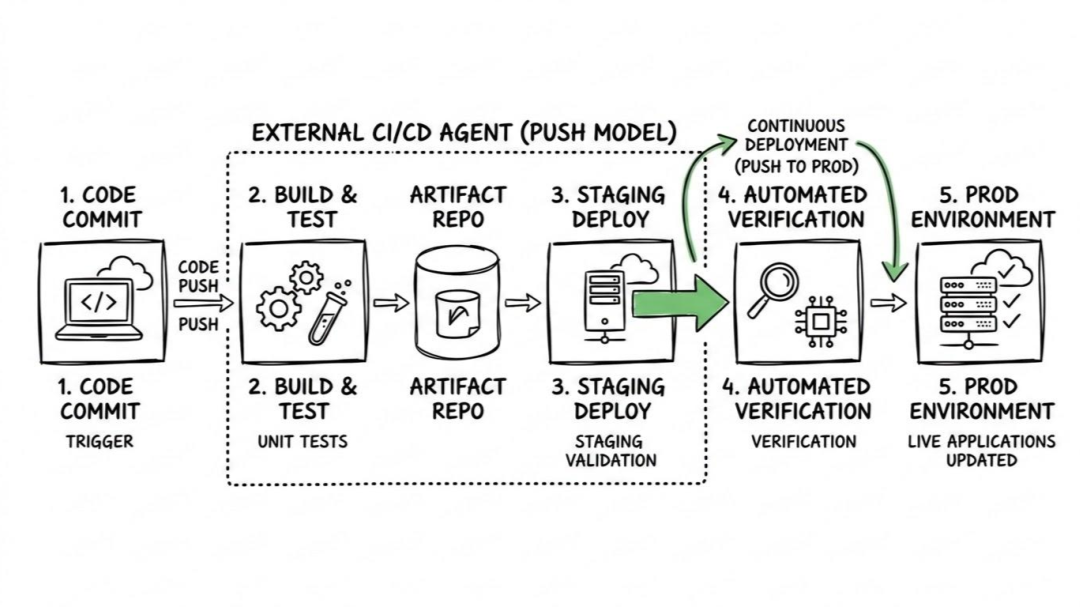
Here is what the flow looks like:
- The Trigger: You push code to your repository.
- The Build: Your CI pipeline detects the change, runs your tests, and builds your artifacts.
- The Connection: The runner authenticates with your target environment. For example, it might use stored AWS credentials to access your VPC and connect to your instances.
- The Execution: The runner actively executes commands on the target. This could be applying a standard Kubernetes manifest, or perhaps executing an Ansible playbook from your central runner to update configurations across your fleet of servers.
The critical takeaway here is that the central server is doing all the heavy lifting. It holds the map to your infrastructure and actively reaches out across the network to make changes happen.
The Pull Workflow: The Inside Job#
The pull model fundamentally changes who is responsible for the deployment. Instead of a central server pushing changes, the deployment logic lives entirely inside the target environment.
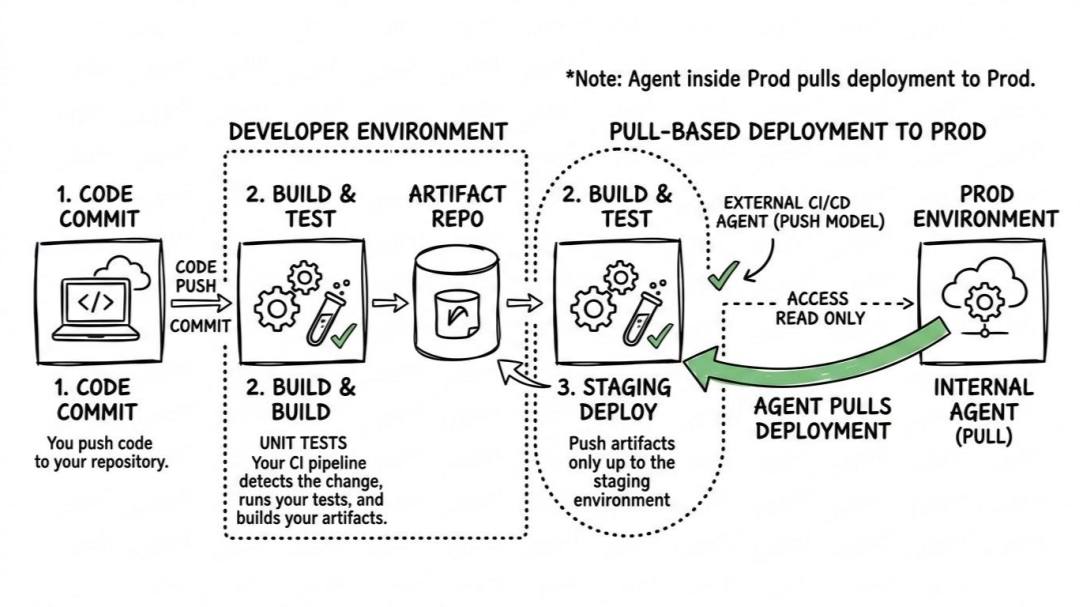
Here is how the GitOps pull flow works:
- The Trigger & Build: Just like the push model, you merge code, and your CI pipeline runs tests and builds the artifact. But that is where the CI pipeline's job ends. It simply pushes the new artifact to a registry and updates a declarative configuration manifest in your Git repository.
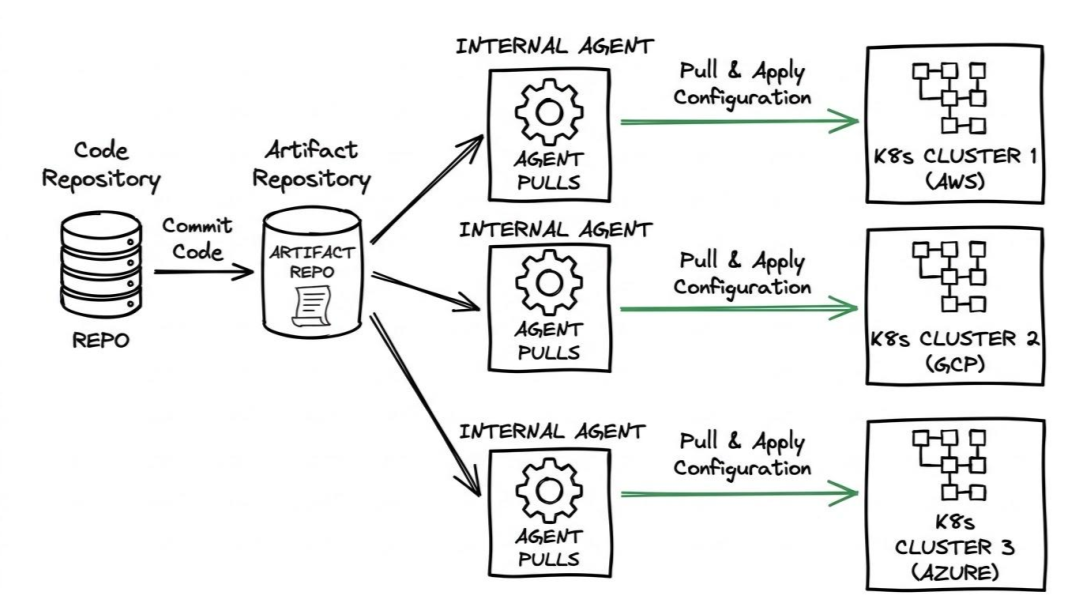
- The Observation: Inside your environment (typically a cluster), a localized agent is constantly running a loop, keeping a close eye on that specific Git repository.
- The Detection: The agent notices that the manifest in Git (your newly declared desired state) no longer matches what is currently running locally (the live state).
- The Convergence: The agent pulls the new configuration down from the inside, applying the changes locally to bring the live environment perfectly in sync with Git.
The Direction of Awareness#
If you take nothing else away from this section, remember this concept: Direction of Awareness.
In a push model, your CI/CD pipeline has to know everything about your target environments. It needs to know the routing rules, the authentication methods, and the specific deployment steps for every single environment it manages.
In a pull model, the environment is completely blind to the rest of the world, except for one thing: it knows the URL of its Git repository. The central CI/CD pipeline does not even need to know the target environment exists. It just updates a file in Git and walks away, trusting the infrastructure to update itself.
This single shift in awareness is exactly what creates the massive security and networking differences we are going to look at next.
The Security & Network Topology Battleground#
Let’s talk about the elephant in the room: security. When you bring your SecOps and networking teams into the architecture discussion, this is usually the exact moment the traditional push model starts to sweat.
The differences here essentially boil down to where your secrets live and which way your network traffic is flowing.
The "God-Mode" Credential Risk#
In a standard push setup, your CI/CD server needs to be God. In order for it to deploy your applications across staging, pre-prod, and production, it needs the credentials for all of those environments. AWS access keys, Kubernetes kubeconfig files, SSH keys, database passwords—they all get stuffed into your central Jenkins, GitLab, or GitHub Actions environment.
Think about the blast radius if that central server is compromised. An attacker doesn't just get access to your source code; they get the literal keys to your entire infrastructure. You have inadvertently built a massive, highly privileged single point of failure.
The pull model solves this by decentralizing your secrets. Because the GitOps agent lives locally, the credentials stay locked securely inside the target environment. The cluster reaches out, pulls down the generic deployment instructions (your manifests), and uses its own localized, tightly-scoped permissions to actually apply them. Your CI server never even touches your production secrets.
Inbound vs. Outbound Networking#
Then there is the firewall nightmare.
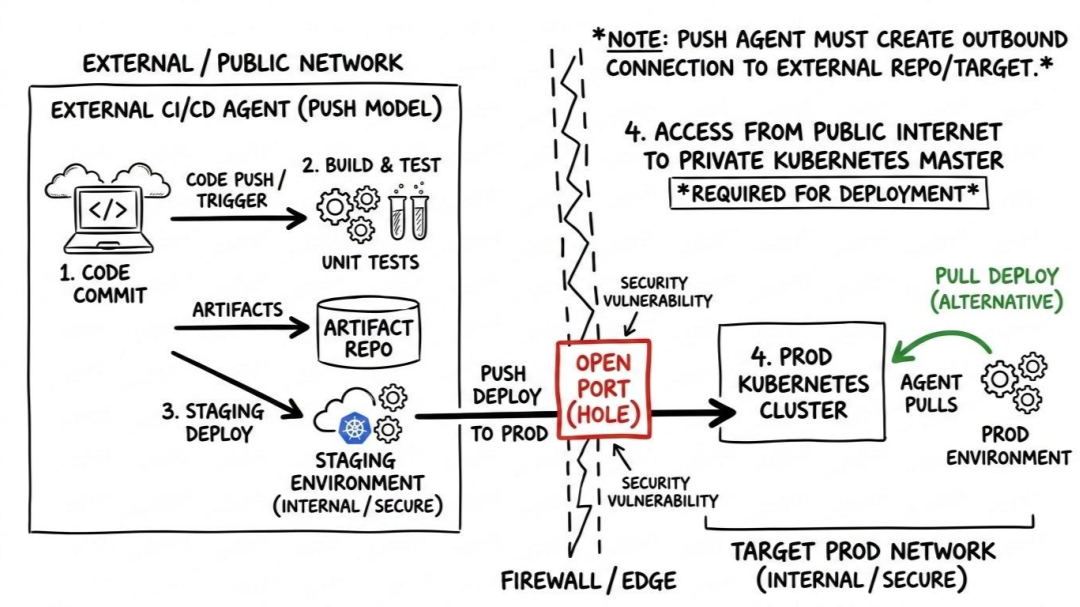
For a central CI server to push a deployment into a secure, private production environment, that environment has to let it in. You have to poke holes in your firewalls to allow inbound traffic, or you have to engineer complicated VPNs, bastion hosts, or IP whitelists just to let your CI runner talk to your cluster. If you have ever tried to explain to a security engineer why you need to open an inbound port to your core database tier, you know it is not a fun conversation.
The pull model elegantly sidesteps this entire problem. Because the agent lives inside the environment, it only needs to make an outbound connection to check the Git repository or pull an image.
Firewalls natively trust outbound traffic. This means your production environment can remain completely sealed off from the outside world, totally private, without exposing a single inbound API endpoint to the public internet—and it will still continuously, automatically update itself.
State Management: Configuration Drift and Self-Healing#
Let’s be honest for a second. We all know that production infrastructure is supposed to be immutable. We all know we aren't supposed to manually tweak things. But when an incident pages the on-call engineer at 2:00 AM and a critical system is hard down, best practices sometimes go out the window. Someone logs into the AWS console to update a routing rule, or hot-patches a Kubernetes deployment directly via the CLI to stop the bleeding.
The immediate crisis is averted, but you've just created a silent, lingering problem: Configuration Drift.
What is running live in production no longer matches what is defined in your source code. How your deployment architecture handles this exact scenario is one of the most profound differences between push and pull models.
Static vs. Continuous Reconciliation#
In a push-based model, deployments are point-in-time operations. It is fundamentally a "fire and forget" mechanism. Your central pipeline pushes the new application state, verifies it started up successfully, and then marks the CI/CD job as green. The pipeline then goes back to sleep.
If an engineer manually alters a configuration two days later, your push pipeline is completely unaware. The environment will sit in that drifted state indefinitely. It isn't until the next time someone merges code and triggers a deployment that the push system wakes up and overwrites the environment. Depending on what that engineer manually changed, this sudden, unexpected overwrite might just break production all over again.
The pull model operates entirely differently. It runs on a continuous reconciliation loop.
The GitOps agent living inside your environment doesn't just act when a deployment is triggered. It runs endlessly, constantly comparing the live environment against the declared state in your repository. If you are used to provisioning infrastructure with tools like Terraform or OpenTofu, think of this like a background process running a continuous apply command every few minutes, aggressively ensuring the actual state perfectly mirrors the desired state.
Combating Drift with Self-Healing#
This continuous observation loop gives pull-based systems a massive operational superpower: Self-Healing.
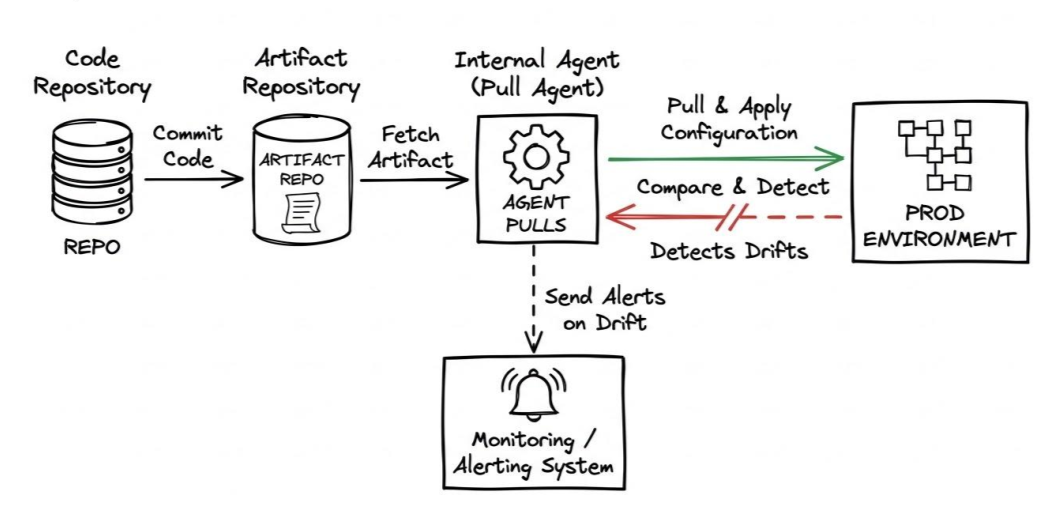
Let's go back to that 2:00 AM incident. An engineer manually alters a live configuration to fix a bug. In a pull-based setup, the local agent is going to notice that discrepancy almost immediately. It looks at the live environment, looks at the Git repository, realizes they don't match, and automatically reverts the manual change back to the approved Git state.
This strict enforcement sounds brutal at first, but it forces a critical engineering discipline across your team: if you want to change production, you have to change it in Git. Because the pull model refuses to let the live environment drift, your Git repository transforms from a simple code storage location into a guaranteed, 100% accurate, auditable ledger of your actual production state. If you ever need to rollback, you don't need to write a rollback script—you just git revert a commit, and the environment heals itself.
Infrastructure Compatibility and Scale#
Now that we’ve tackled security and state management, let's look at the actual footprint of your infrastructure. This is where the choice between push and pull goes from an architectural debate to a pragmatic reality check.
Depending on what your tech stack looks like—whether you’re managing a fleet of legacy virtual machines, building serverless functions, or running entirely on Kubernetes—one model is going to fit a lot more naturally than the other.
The Push Model: The Ultimate Swiss Army Knife#
If your infrastructure is a bit of a mixed bag, the push model is your best friend.
Think about a typical enterprise environment. You might have some modern containerized apps, but you also likely have legacy monolithic applications running on traditional VMs (like AWS EC2 or bare-metal servers), some standalone databases, and maybe a few serverless functions (like AWS Lambda) thrown into the mix.
Because a push-based system just needs a central runner that can execute scripts or call cloud APIs, it is incredibly versatile. A single Jenkins pipeline or GitLab runner can kick off a Docker build, run a Terraform plan to provision a cloud database, deploy a serverless function via an API, and SSH into an older VM to update an Nginx configuration file. It doesn't care what the target is; as long as the runner has a network path and the right credentials, it can deploy to it.
The Pull Model: Built For the Cloud-Native World#
The pull model, on the other hand, is highly specialized. It is essentially built from the ground up for Kubernetes and declarative, API-driven environments.
Because the pull model relies on an agent running natively inside the environment to continuously reconcile state, the underlying infrastructure needs to support that kind of control loop. Kubernetes is perfect for this because its entire architecture is already built around controllers and reconciliation.
But if you try to apply a strict pull-based GitOps workflow to a legacy application running on a traditional virtual machine or a physical network switch, things get complicated fast. You would have to write custom daemons or agents to handle the polling, drift detection, and local convergence. For most engineering teams, the sheer operational overhead of trying to force non-declarative infrastructure into a pull model just isn't worth it.
Scaling To the Edge and Multi-Cluster Topologies#
Scale also flips the dynamic between these two approaches:
- Pushing at Scale: As you scale up to hundreds of target environments or clusters, a central push architecture can become a massive bottleneck. The central server has to manage hundreds of concurrent network connections, handle thousands of secrets, and process enormous queues of deployment jobs. If that central orchestrator slows down, your entire delivery pipeline grinds to a halt.
- Pulling at Scale: Pull systems scale horizontally by design. If you have 500 Kubernetes clusters running across different global regions or edge locations, each cluster has its own independent agent handling its own deployments. They all poll the central Git repository asynchronously. The load is completely distributed, meaning your central infrastructure doesn't break a sweat, no matter how many target environments you add.
The Modern Tool Landscape & Hybrid Architectures#
Alright, let’s put some names to these concepts. If you are building a deployment pipeline today, you are likely choosing from a few heavy hitters.
The Pure Pull (GitOps) Leaders#
If your infrastructure is heavily containerized and you want a strict pull-based architecture, two open-source tools absolutely dominate the space:
- Argo CD: This is the current enterprise darling. It operates on a hub-and-spoke model, meaning you run a central Argo CD instance that manages your deployments. It comes with a gorgeous, centralized web UI that makes it incredibly easy for developers to visualize exactly what is running in the cluster and quickly spot what is out of sync.
- Flux: The purist’s choice. Instead of a central UI, Flux relies on a highly modular, decentralized, agent-per-cluster model. You install Flux in every single cluster, and they independently poll your Git repositories. It is incredibly lightweight and secure, making it a massive favorite for massive multi-cluster setups and resource-constrained edge computing environments.
The Traditional Push Workhorses#
If you have a mixed-infrastructure environment—like legacy VMs, serverless functions, and managed databases—you need the versatility of the classic push engines:
- Jenkins: The old reliable. With thousands of plugins, Jenkins can script a deployment to literally anything with an IP address or an API endpoint. It requires significant operational maintenance, but it remains the ultimate deployment Swiss Army knife.
- GitLab CI / GitHub Actions: These integrated platforms are where most teams start today. You commit your code, a runner spins up, builds the artifact, authenticates with your target cloud provider, and pushes the deployment out via standard API commands. It is simple, effective, and deeply integrated into the developer experience.
- Spinnaker: A heavy-duty push engine built by Netflix. It is specifically designed for orchestrating incredibly complex, multi-cloud rollouts—like automated canary analysis and blue/green deployments—across AWS, GCP, and Kubernetes simultaneously.
The Blurring Lines: Hybrid Architectures#
The pull model tools excel at CD. But the push tools take care of the entire CICD pipeline including CI.
This leads to a Hybrid Architecture where you use a push-based tool for CI and a different pull-based tool for CD:
- Push (CI): A developer merges code. GitHub Actions runs unit tests, builds a Docker image, and pushes it to an image registry.
- The Handoff: GitHub Actions runs one final script—it updates the Kubernetes manifest in your Git repository with the newly built image tag.
- Pull (CD): Argo CD or Flux, sitting quietly inside your cluster, notices the Git repository was updated. It wakes up, pulls the new configuration inside, and safely updates the live environment.
You get the world-class, flexible CI experience of GitHub or GitLab, paired with the rock-solid security, drift detection, and self-healing capabilities of GitOps.
The lines are blurring so much that the major push platforms are natively adopting pull mechanisms.
For example, GitLab offers the GitLab Kubernetes Agent. Instead of a traditional GitLab runner reaching across the internet into your firewall, you install this agent natively inside your cluster. It establishes a secure, outbound-only connection back to GitLab, essentially giving you a highly secure, pull-based GitOps deployment without forcing your team to adopt an entirely separate toolset.
At the end of the day, the industry is no longer fighting over which architecture is universally "better." We are just focusing on wiring them together to secure our infrastructure while keeping developers moving as fast as possible.

Indika Kodagoda
Indika Kodagoda is a Lead DevOps Engineer, AWS certification instructor, and the creator of CloudQubes. He specializes in cloud infrastructure, automation, and modern Ruby on Rails development. When he’s not deploying code or mentoring aspiring engineers, he’s usually enjoying nature and cycling local gravel paths.