
Modern AWS ECS Deployment Strategies without CodeDeploy
How to execute native AWS ECS Canary, Linear, and Blue/Green deployments without CodeDeploy. Master traffic shifting and GitHub Actions CI/CD automation.
format_list_bulleted
Table of Contents
16 sections
expand_more
Historically, if you wanted to move beyond a basic Rolling Update on Amazon ECS, you hit a wall of operational complexity.
Executing a Blue/Green or Canary deployment required provisioning a separate AWS CodeDeploy application and linking it to your ECS service. This meant maintaining custom appspec.yaml files, juggling additional IAM permissions for cross-service communication, and managing deployment lifecycles across two completely different AWS domains.
It worked, but it added significant friction and infrastructure-as-code (IaC) bloat to what should have been a seamless container rollout.
The Native Shift: ECS Takes the Wheel#
In late 2025, AWS fundamentally shifted this architecture. The ECS service scheduler itself was upgraded to natively own load balancer listener rules and advanced rollout behaviors. Instead of handing off the traffic-shifting logic to an external controller like CodeDeploy, ECS now handles percentage-based routing and automated cutovers internally.
The biggest win for cloud engineers is the elimination of cross-console management.
Whether you are shifting 10% of traffic for a Canary test or executing an all-at-once Blue/Green swap, the entire lifecycle is now configured and managed directly within the ECS Console, the AWS CLI, or your primary ECS infrastructure code (CloudFormation, CDK, Terraform).
By cutting out the CodeDeploy middleman, deployment pipelines run faster, troubleshooting is centralized, and the blast radius of IAM permissions is significantly reduced.
The Native Strategies Defined#
Amazon ECS now natively handles deployment orchestration, eliminating the need to provision AWS CodeDeploy or write custom appspec.yaml files.
ECS, out of the box supports four distinct deployment strategies.
Deployment Strategy #1: Rolling Update (The Default)#
ECS replaces old tasks with new ones incrementally.
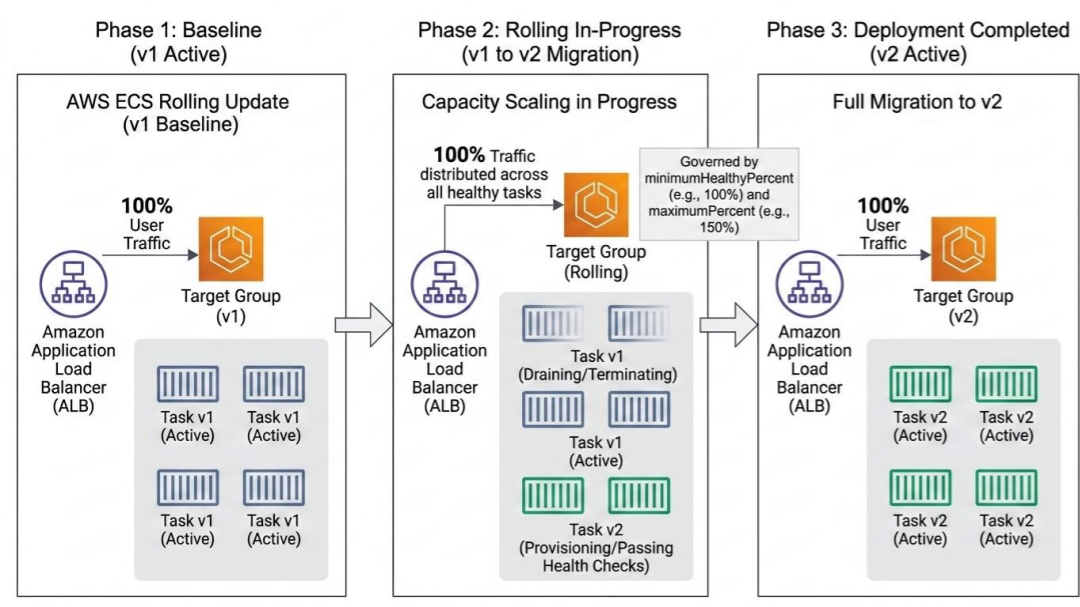
You control the velocity and safety of the rollout using two key parameters: minimumHealthyPercent (keeps a baseline of capacity running) and maximumPercent (allows extra tasks to spin up before draining old ones).
Deployment Strategy #2: Blue/Green (All-At-Once)#
ECS spins up a completely parallel "green" environment alongside your active "blue" environment.
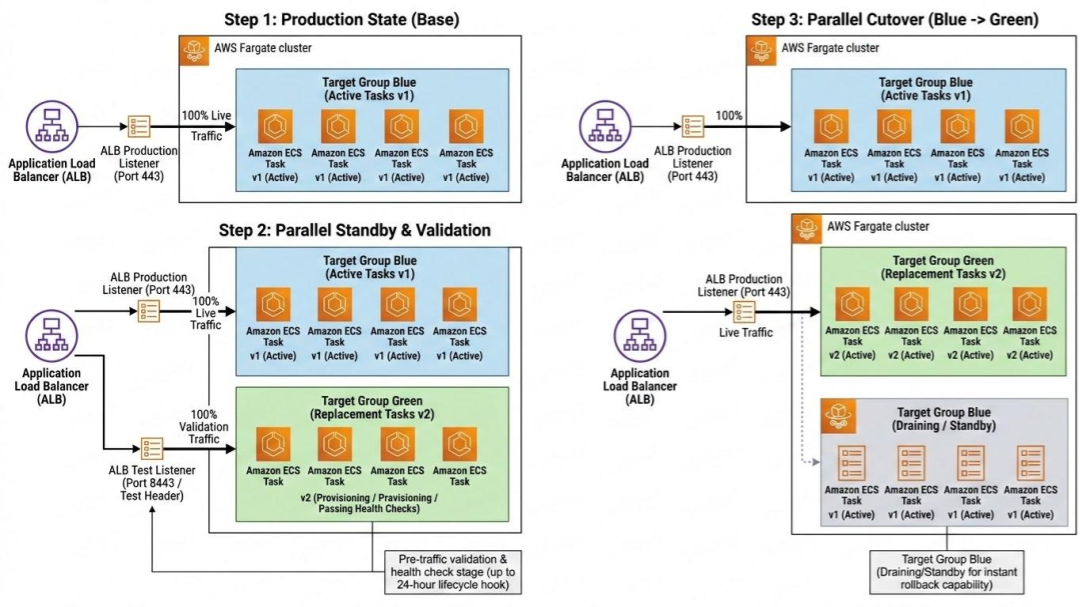
Before production traffic shifts, you can route a secondary test listener to the green tasks to perform "Dark Canary" validation with zero user impact. Once validated, the load balancer shifts 100% of production traffic to the new version instantly. The native version also features extended lifecycle hooks that can run for up to 24 hours per stage.
Deployment Strategy #3: Canary#
A two-stage deployment where a small, fixed percentage (e.g., 5-10%) of production traffic is routed to the new version to limit the blast radius of potential bugs.
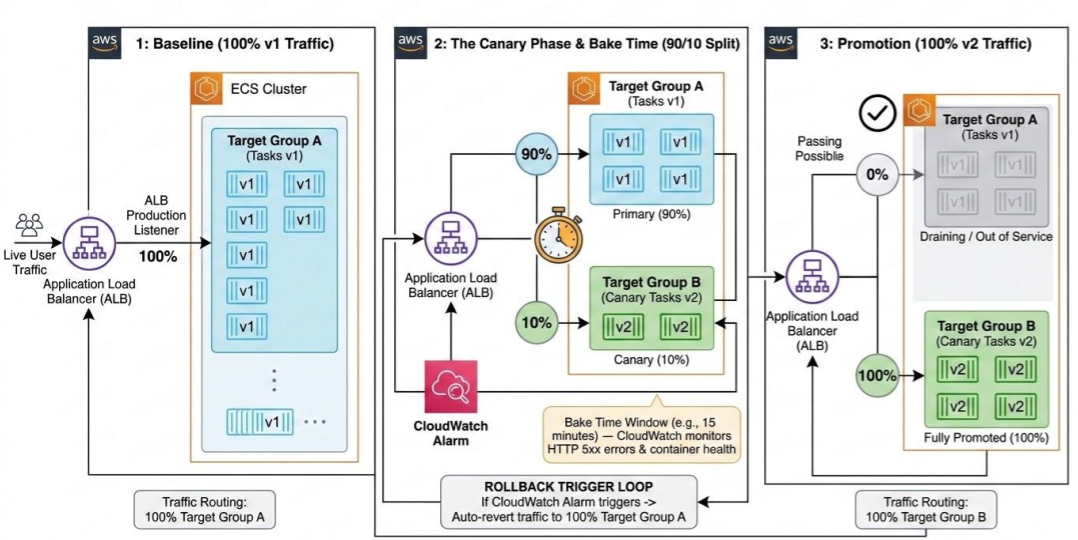
The system holds this traffic distribution for a configured "bake time". If the new version performs correctly, the remaining traffic is shifted over.
Deployment Strategy #4: Linear#
Traffic shifts gradually in equal increments separated by defined intervals.
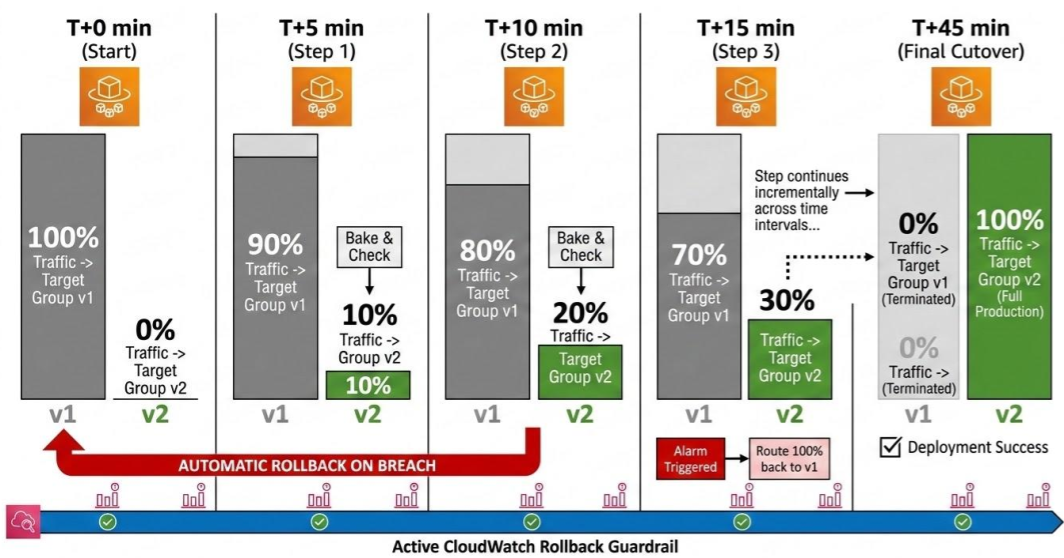
For example, you can configure the shift in 10% steps, pausing for a 5-minute bake time at each stage to validate performance metrics before proceeding to the next step.
If CloudWatch alarms trigger during a Canary or Linear shift, ECS automatically halts the rollout, shifts traffic back to the stable version, and terminates the new tasks.
Automating Native Deployments with CI/CD#
Before automating, it is crucial to understand how rollbacks work natively.
When you configure Canary or Linear strategies on your ECS service, you can attach CloudWatch alarms directly to the deployment process. If your new version causes CPU spikes, memory leaks, or a high rate of HTTP 5xx errors during the traffic-shifting "bake time", ECS monitors those alarms natively.
If an alarm triggers, ECS automatically halts the rollout, instantly shifts 100% of traffic back to the stable tasks, and terminates the failing containers.
Automating with GitHub Actions#
Because the ECS service itself now acts as the deployment controller, CI/CD pipelines are remarkably streamlined. You no longer need workflow steps to generate custom appspec.yaml files or trigger external CodeDeploy API calls.
Here is the modern, three-step GitHub Actions workflow to automate a native ECS deployment:
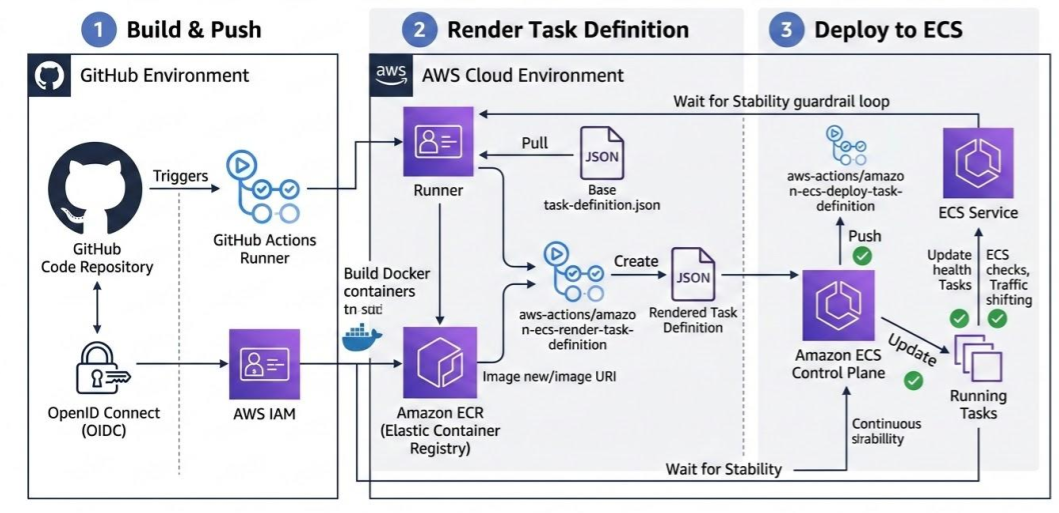
Build and Push to Amazon ECR: Authenticate your workflow with AWS (using OpenID Connect (OIDC) is best practice to avoid storing long-lived credentials), build your Docker image, and push the new version to your Elastic Container Registry.
Render the Task Definition: Use the
aws-actions/amazon-ecs-render-task-definitionaction. This step takes your repository's basetask-definition.jsonfile and dynamically injects the new ECR image URI into the container definition.Deploy to ECS: Use the
aws-actions/amazon-ecs-deploy-task-definitionaction. You simply pass the rendered task definition, your cluster name, and the service name to the action. Because the rollout strategy (Rolling, Canary, Linear, or Blue/Green) is already defined at the ECS service level, this single step triggers the full traffic-shifting lifecycle natively, bypassing CodeDeploy entirely.
Pro-Tip: Always set wait-for-service-stability: true in your deployment action. This ensures the GitHub Actions runner waits and monitors the deployment until all native health checks pass and the final traffic shift is complete, preventing false-positive "success" notifications.
AWS Certification Traps to Avoid#
When sitting for exams like the AWS Certified Solutions Architect or DevOps Engineer Professional, you will face questions specifically designed to test your knowledge of ECS deployment limits and legacy versus modern architectures.
- The Controller Vocabulary Trap: Legacy exam questions often position AWS CodeDeploy as the only way to achieve Blue/Green or Canary deployments on ECS. While setting the deployment controller to
CODE_DEPLOYwas historically required, the modernECSdeployment controller now natively supports Blue/Green, Canary, and Linear strategies. If a question asks for the most "operationally efficient" or "simplest" architecture for a Canary deployment, look for the native ECS controller option rather than provisioning a separate CodeDeploy application. - The
appspec.yamlRequirement: A classic exam distractor. If you are using the legacyCODE_DEPLOYcontroller, you strictly must maintain anappspec.yamlfile to map task definitions to target groups. If you are using the nativeECSdeployment controller, anappspec.yamlis never used; the routing configuration lives entirely within the ECS service definition. - Rolling Update Math (
minimumHealthyPercentvs.maximumPercent): Exams frequently test capacity and cost planning during deployments. - *The Zero-Downtime / Double Capacity Scenario:" To guarantee 100% availability without dropping a single request, set
minimumHealthyPercentto 100% andmaximumPercentto 200%. This spins up the new task version before killing the old ones, temporarily doubling your compute footprint. The Cost-Constrained Scenario: If an exam scenario strictly forbids provisioning additional capacity during an update (due to EC2 host limits or cost restrictions), set
minimumHealthyPercentto 50% andmaximumPercentto 100%. This deliberately kills half of your running tasks first to make room for the new ones, reducing your baseline capacity during the rollout but maintaining the hard capacity limit.Load Balancer Prerequisites: You cannot execute a Blue/Green or Canary deployment on a standalone ECS service. The exam will test this architectural rule: these advanced deployment strategies strictly require an Application Load Balancer (ALB) or Network Load Balancer (NLB) configured with two distinct target groups (one for active production traffic, and one for the replacement/test traffic).
Rollback Speed Differences: Be ready to distinguish between rollback mechanics. If an alarm triggers during a standard Rolling Update, ECS must slowly provision and launch new tasks with the previous image (a slow rollback). If an alarm triggers during a Blue/Green deployment, the load balancer simply flips the listener rule instantly back to the old target group (an instantaneous, zero-downtime rollback).
FAQ: Amazon ECS Native Deployments#
Does Amazon ECS support Canary deployments natively?#
Yes. As of late 2025, Amazon ECS fully supports native Canary and Linear deployment strategies. You no longer need to provision an external AWS CodeDeploy application to execute percentage-based traffic shifting. The ECS service scheduler manages the traffic routing and bake times directly at the load balancer level.
What is the difference between an ECS Rolling Update and Blue/Green deployment?#
A Rolling Update replaces old tasks with new tasks gradually within the same target group. A Blue/Green deployment provisions an entirely separate environment (a "green" target group) alongside the current production environment (the "blue" target group). Once the green environment passes health checks, the load balancer instantly shifts 100% of the traffic to the new version, enabling zero-downtime cutovers and instantaneous rollbacks.
Do I need an appspec.yaml file for ECS deployments?#
If you are using the modern, native ECS deployment controller, you do not need an appspec.yaml file. The traffic routing logic is managed entirely within the ECS service definition. You only need an appspec.yaml if you are using the legacy CODE_DEPLOY controller.
How do I automate ECS deployments using GitHub Actions?#
To automate a native deployment, you only need two primary GitHub Actions after building your image. First, use aws-actions/amazon-ecs-render-task-definition to inject your new container image URI into your base task definition. Then, use aws-actions/amazon-ecs-deploy-task-definition to push the update to your cluster. Because ECS handles the deployment strategy natively, this action triggers the rollout and waits for stability automatically.
Why do ECS Blue/Green and Canary deployments require two target groups?#
Advanced traffic-shifting strategies rely on the load balancer to route traffic between the stable application version and the new version. The load balancer needs two distinct target groups to achieve this: one target group for the original tasks (e.g., 90% of traffic) and a second target group for the new replacement tasks (e.g., 10% of traffic).
How does the ECS Deployment Circuit Breaker work?#
The ECS Deployment Circuit Breaker is a native safeguard for Rolling Updates. If a new deployment continuously fails to pass health checks or crashes upon startup, the circuit breaker halts the deployment and automatically rolls the service back to the last stable task definition, preventing infinite loops of failing task launches.

Indika Kodagoda
Indika Kodagoda is a Lead DevOps Engineer, AWS certification instructor, and the creator of CloudQubes. He specializes in cloud infrastructure, automation, and modern Ruby on Rails development. When he’s not deploying code or mentoring aspiring engineers, he’s usually enjoying nature and cycling local gravel paths.