
5 Ways to Run Your Containerized App on AWS in 2026
App Runner is dead. What's next? Discover the 5 ways to run containers on AWS in 2026. Compare EC2, Lambda, EKS, and the new ECS Express Mode.
format_list_bulleted
Table of Contents
8 sections
expand_more
Containers are the most widely accepted method for running server-side applications in 2026.
Putting your code into a container is the easy part. The real architectural challenge begins when you log into AWS and realize you have a half-dozen different ways to run it.
Depending on your scaling needs, budget, and operational "toil" tolerance, AWS offers a spectrum of services. As of early 2026, the landscape has shifted significantly—specifically with the sunsetting of older "PaaS-style" services in favor of smarter, automated orchestration.
Here is a breakdown of the five primary ways to run containers on AWS today, complete with their strengths, weaknesses, and exactly when to use them.
1. Amazon EC2: The "Old School" Heavyweight#
Running Docker directly on EC2 virtual machines is the most manual approach, but it offers absolute, unyielding control.
- Pros: Total access to the host operating system kernel, custom networking configurations, and the ability to leverage specialized hardware like NVIDIA GPUs or high-performance Graviton chips. Not only that. Running your app on EC2 allows you to customize your entire application delivery architecture. For example, you can opt out of AWS ALB and simply expose your app to the Internet to serve non-HTTP traffic.
- Cons: Maximum operational overhead. You are responsible for patching the AMI, managing scaling logic, maintaining high availability, and securing the underlying host.
- Best For: Legacy applications with strict OS dependencies, or machine learning workloads that require dedicated, uninterrupted GPU access.
2. AWS Lambda: The Event-Driven Sprint#
Lambda is famous for "Functions as a Service," but it can actually run container images up to 10GB in size, allowing you to use your standard Docker tooling for serverless execution.
- Pros: True zero maintenance. You only pay for the exact milliseconds your code is running. It scales near-instantly to thousands of concurrent executions.
- Cons: The hard "15-minute" execution limit. It is not designed for persistent web servers, long-running background jobs, or applications that suffer from "cold start" latency.
- Best For: Event-driven architectures (like processing an S3 image upload), data pipelines, and low-traffic internal APIs.
3. AWS App Runner: The "End of an Era"#
App Runner was originally designed for the ultimate "code-to-URL" experience, offering a Heroku-like simplicity.
As of April 30, 2026, App Runner is in Maintenance Mode. It is no longer accepting new customers.
- Pros (Historical): Minimal configuration; handled load balancing, HTTPS, and auto-scaling automatically.
- Cons: Opaque networking, limited visibility, and a fixed cost structure per service that scaled poorly for multi-service architectures.
- Best For: Existing, grandfathered applications only. It is strongly recommended to migrate off this platform.
4. Amazon ECS & ECS Express Mode: The Modern Workhorse#
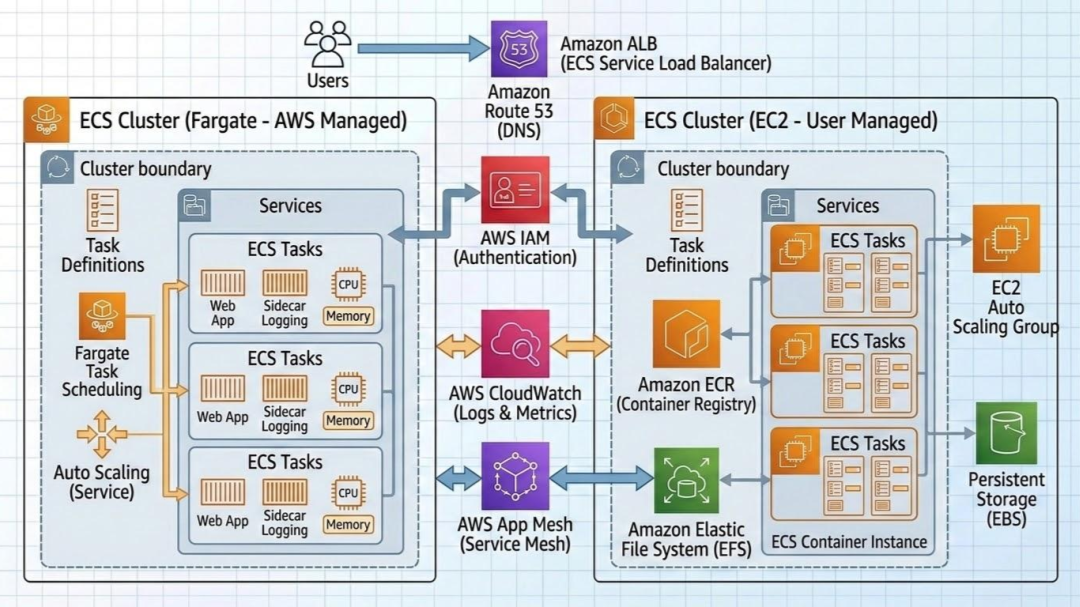
Amazon Elastic Container Service (ECS) is AWS’s native orchestrator. It strikes a powerful balance between capability and simplicity, especially when paired with AWS Fargate (the serverless compute engine).
Historically, setting up ECS required significant "boilerplate" infrastructure—VPCs, Application Load Balancers (ALBs), and complex Target Groups.
Enter ECS Express Mode
To replace App Runner, AWS introduced ECS Express Mode as the new standard for web apps and APIs. It gives you the "one-click" simplicity of a PaaS, but builds standard, visible ECS resources in your account.
- Pros: Single-command deployments that automatically provision a shared load balancer (cutting costs drastically), manage canary deployments (shifting 5% of traffic initially to test health), and configure auto-scaling.
- Cons: If you need complex internal service mesh routing (like Istio) or specialized EFS storage mounts, you still need to use standard ECS configurations rather than Express Mode defaults.
- Best For: The vast majority of new web applications, APIs, and microservices. It is the perfect "Goldilocks" zone of low operational effort and high production readiness.
You can read more about ECS express mode here.
Key insight: You don't have to choose between simplicity and power anymore. You can start a project in ECS Express Mode and "eject" into standard ECS later if your architecture becomes more complex, without migrating to a new service.
5. Amazon EKS: The Enterprise Standard#
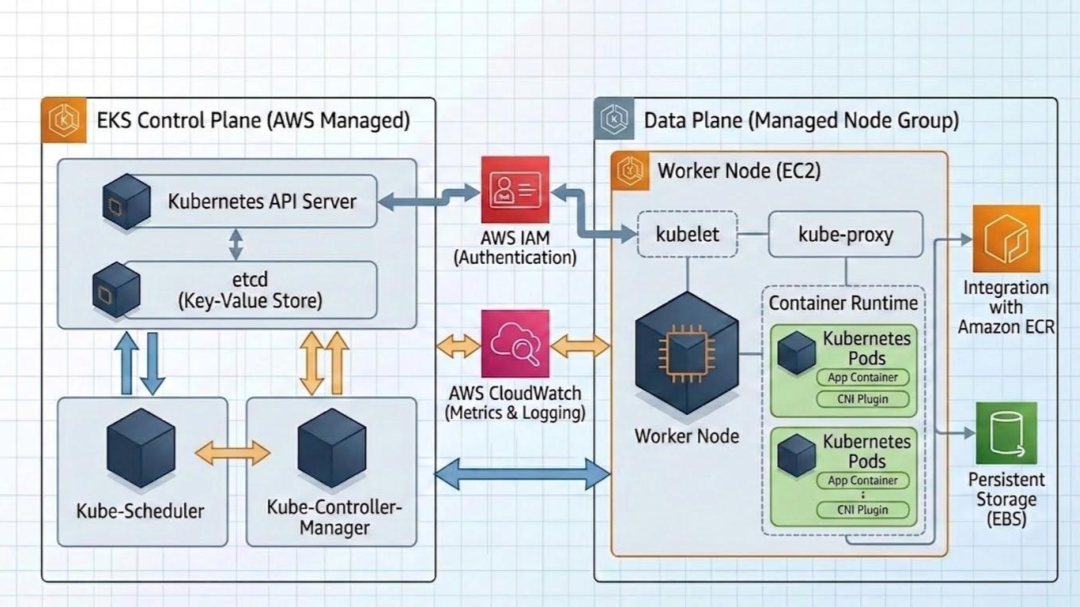
Elastic Kubernetes Service (EKS) is the industry standard for managed Kubernetes control planes.
- Pros: Total portability. If you are running Kubernetes in your on-premises data center or across multiple cloud providers (like Azure or GCP), EKS keeps your deployment workflows identical.
- Cons: A notoriously steep learning curve, higher baseline costs (for the control plane), and significant management overhead to maintain the cluster add-ons.
- Best For: Large-scale, complex microservice architectures, enterprise teams with deep existing Kubernetes expertise, or strict multi-cloud operational requirements.
Wrapping up: The Architecture of Competency#
Choosing how to run a container on AWS isn't just about comparing service features or minimizing your Application Load Balancer bill. It’s an architectural decision that directly mirrors your team’s internal engineering competency.
There is no single "right" service—only the right service for your current operational scale. Opting for ECS Express Mode is a brilliant, low-toil strategy for launching a new Python API quickly, but its true power is that it leaves the door wide open. As your infrastructure demands grow, your understanding of the underlying AWS networking and security stack must grow with it, allowing you to transition smoothly into Standard ECS or EKS without hitting a structural brick wall.
Building that architectural intuition doesn't happen overnight or by skimming a single documentation page. It requires consistent, deliberate exposure to real-world cloud scenarios and systems design patterns.
Validate Your Expertise: Get Certified#
If you are looking to formalize this knowledge and prove you can architect production-grade container systems, pursuing targeted milestones like the AWS Certified Developer – Associate or the AWS Certified DevOps Engineer – Professional is an excellent roadmap. These certifications force you to look past the "easy buttons" and deeply understand how compute, security, and traffic management interface under heavy load.
Sharpen Your Skills, One Day at a time#
Passing an exam is just a byproduct of a deeper habit: continuous learning.
If you want to keep your cloud skills sharp, build long-term retention, and master the micro-decisions that separate junior scripts from senior infrastructure-as-code, you need daily practice.
Subscribe to the daily practice questions right below. Every single day, we drop one high-signal, scenario-based question designed to help you prepare for the next cloud certification.
But most important of all. It will help you build a daily habit of learning. And compounding return on your engineering judgment will be massive.

Indika Kodagoda
Indika Kodagoda is a Lead DevOps Engineer, AWS certification instructor, and the creator of CloudQubes. He specializes in cloud infrastructure, automation, and modern Ruby on Rails development. When he’s not deploying code or mentoring aspiring engineers, he’s usually enjoying nature and cycling local gravel paths.